Midjourney currently has four subscription tiers: Basic, Standard, Pro, and Mega. Plans renew automatically each month or year, and paying a year upfront costs 20% less. The comparison below was checked on 2026-11-20 against the official pricing page and Midjourney’s docs, covering plan differences, Fast / Relax, Stealth Mode, and how to subscribe.
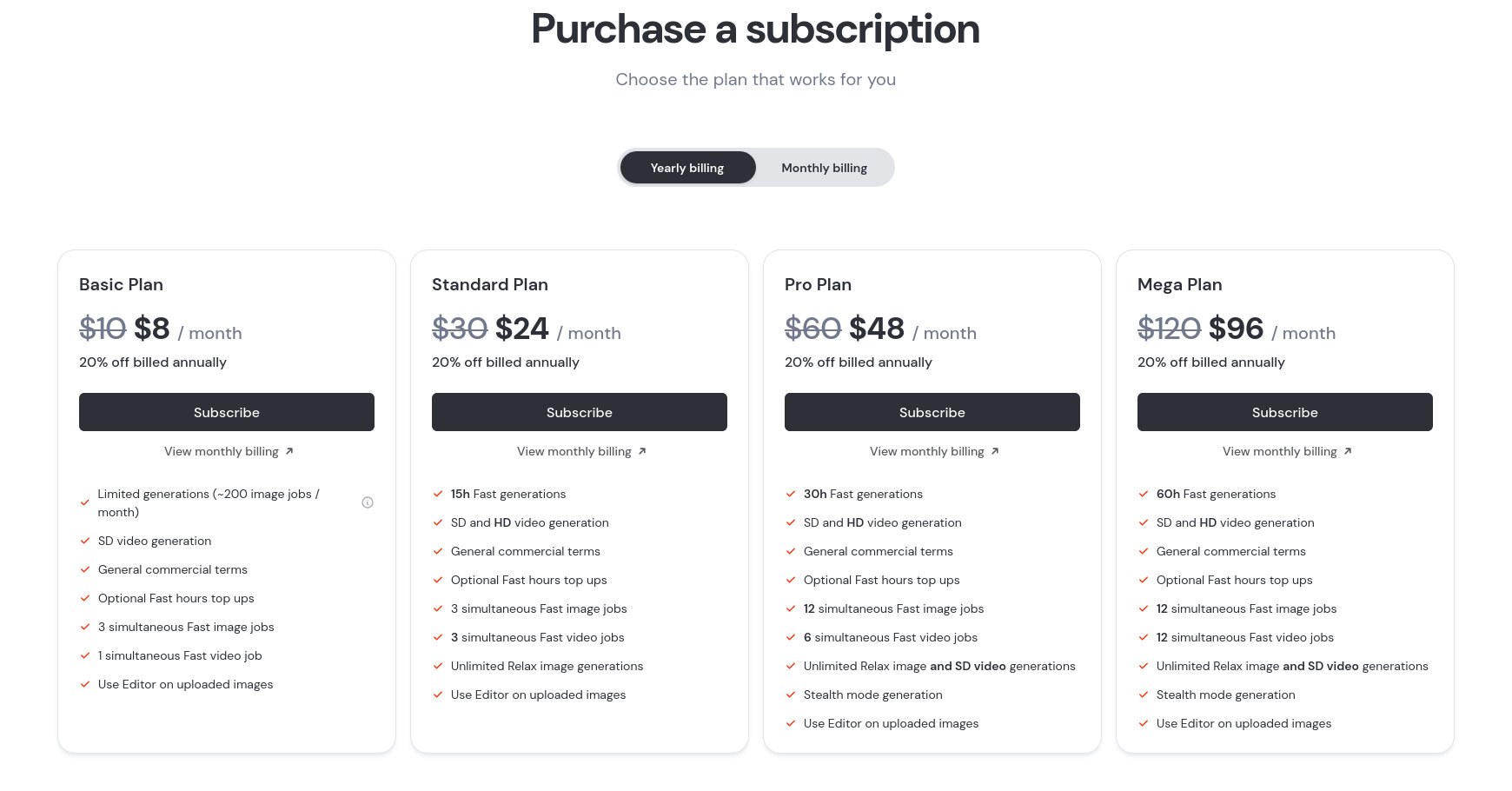
The image below shows the four plans on the official pricing page that day.
Which plan to choose
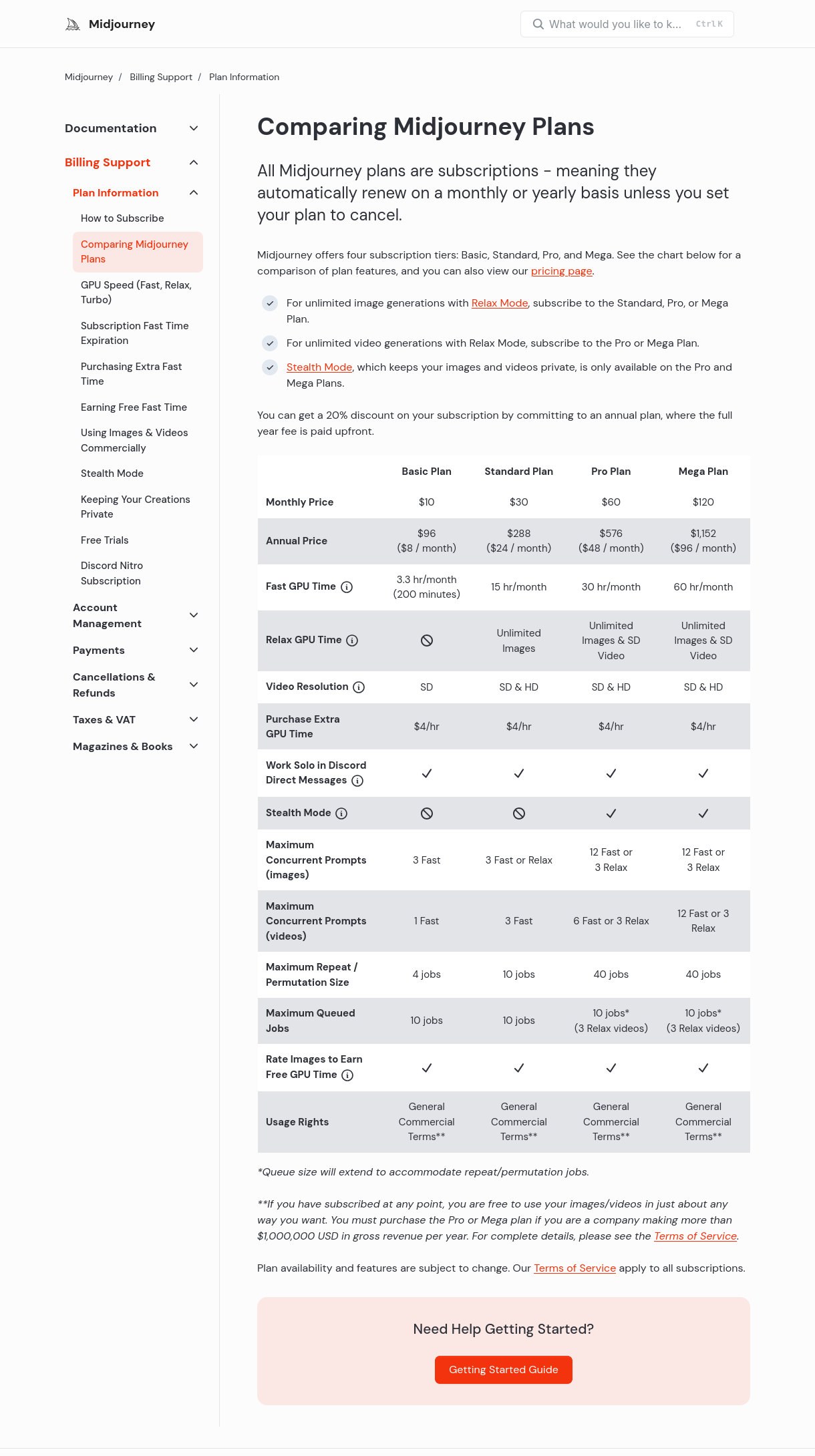
- Basic: $10 per month ($8 per month if billed annually), with 3.3 hours of Fast time (about 200 image jobs). SD video only, and no Relax. Best for occasional use.
- Standard: $30 per month ($24 per month if billed annually), with 15 hours of Fast time, SD and HD video, and unlimited Relax images. This is the usual choice for regular image work.
- Pro: $60 per month ($48 per month if billed annually), with 30 hours of Fast time, unlimited Relax images and SD video, plus Stealth Mode.
- Mega: $120 per month ($96 per month if billed annually), with 60 hours of Fast time, higher video concurrency, Stealth Mode, and the same unlimited Relax images and SD video.
Companies with more than $1,000,000 in annual gross revenue need Pro or Mega for commercial use. See Midjourney’s Comparing Midjourney Plans article for the full official chart.
Fast, Relax, and Turbo
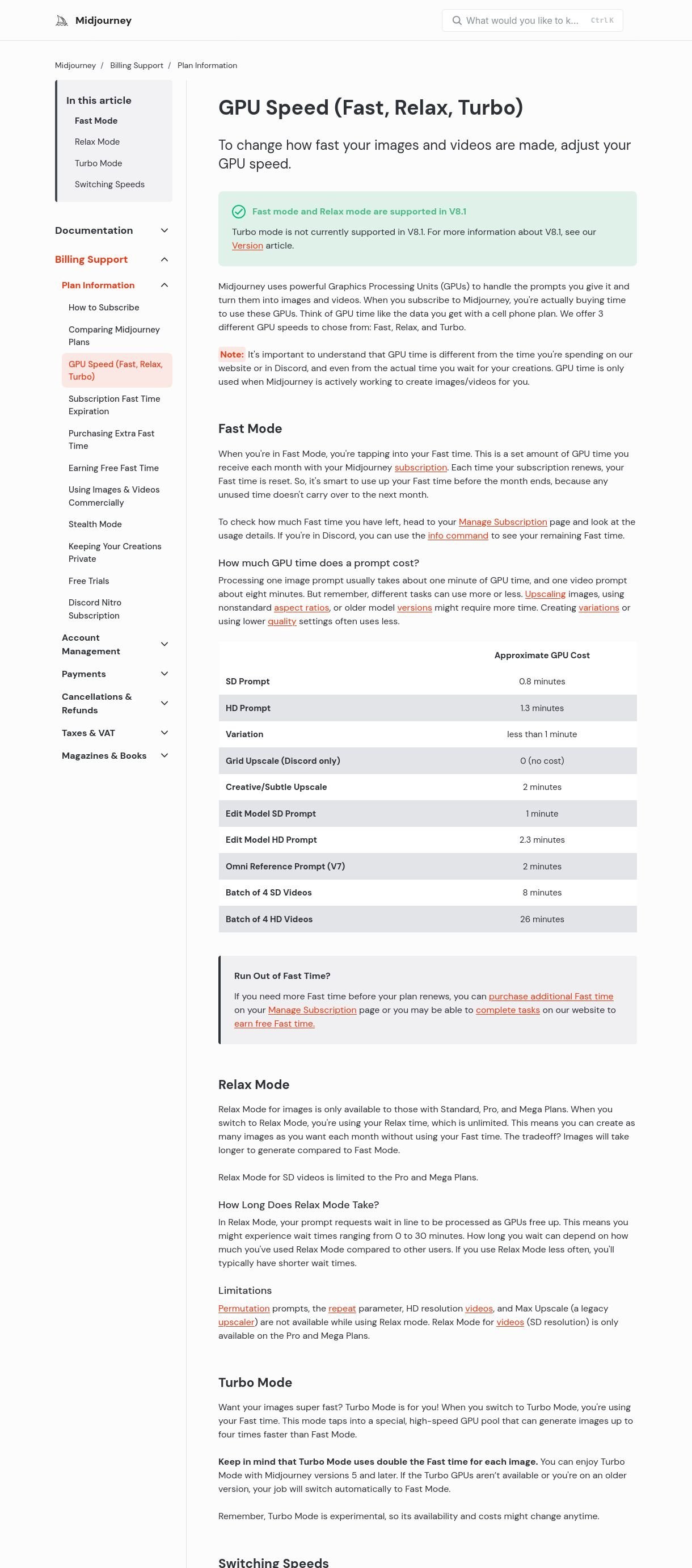
A subscription buys GPU time. Fast or Turbo draws from your monthly Fast allowance, which resets when the plan renews; unused time does not carry over. An image prompt usually uses about one minute, and a video prompt about eight minutes. Relax does not use Fast time: Standard, Pro, and Mega can use it for images, but only Pro and Mega can use Relax for SD video. Jobs wait in a queue; Midjourney says waits can range from 0 to 30 minutes. HD video and permutation prompts are not available in Relax. The Basic plan has no Relax mode.
Turbo is faster but uses twice as much Fast time. Midjourney currently says Turbo mode is not supported in V8.1.
Change the default speed in the Imagine bar settings, or add --fast, --relax, or --turbo to a prompt. In Discord you can use /fast, /relax, or /turbo. Check remaining Fast time on the Manage Subscription page, or with /info in Discord.
When you need Stealth Mode
Midjourney is public by default, and your work may appear on the Explore page. Stealth Mode is only on Pro and Mega, and it hides your creations from other members on midjourney.com. People can still see work you generate in public Discord channels. For more privacy, create on the website Create page, or use Stealth Mode in Discord direct messages or a private server.
Turn it on in the Imagine bar settings, or add --stealth to a single prompt; in Discord, use /stealth. Upgrading does not automatically hide work that is already public—you have to change those items manually on the Organize page.
How to subscribe and add Fast time
- Sign in at midjourney.com and open Manage Subscription.
- Yearly billing is selected by default, and the full year is paid upfront. For monthly billing, switch to Monthly Billing first, then choose a plan and click Subscribe.
- Complete checkout with Stripe, Midjourney’s payment processor. The confirmation email goes to the billing email used at checkout.
- If you run out of Fast time, you can buy more from your account page at the official rate of $4 per hour. Purchased time expires after 60 days if unused and cannot be refunded. You may also be able to earn free Fast time on the Tasks page; earned time expires after 30 days if unused.
- Upgrades can take effect immediately, with a discount based on unused Fast time. Downgrades take effect at the next renewal and do not refund the current plan.
Unused Fast time does not roll over, so use Fast first before renewal. If you are not in a hurry, Standard and higher plans can switch to Relax.
Prices and rules were checked on 2026-11-20 against midjourney.com/pricing and Midjourney’s official docs. Midjourney may change its plans, so rely on Manage Subscription and the official site at the time you subscribe. This site lists Midjourney accounts and Basic / Standard / Pro / Mega plans; details are those shown on the product page.
If you need a Midjourney account or plan, see the product page on this site. Options and prices are those shown at the time you order.