“Usage reset” does not mean the chat's memory is being cleared. Usage limits control how much you can do in a given period. How long a single conversation can run is a separate length or context-window limit. Exact amounts vary by plan, model, and task, so treat the figures in your account's usage page and any on-screen countdown as the source of truth. Checked on 21 November 2026 (Singapore time).
Three ways a limit can be timed
The first starts when you first use the product: the window begins with your first message in that period, and the allowance returns in full when the window ends. It does not come back message by message, and used capacity does not drip back as time passes.
The second is a fixed reset: the allowance returns at a set time each week that is assigned to your account, regardless of when you started using the product or when your subscription began.
The third is a rolling window: only usage from the recent period counts, and older usage expires gradually. Do not treat Claude's five-hour session as this kind of per-message return.
Claude: a five-hour session that refills all at once, plus a fixed weekly time
Usage on claude.ai, desktop, the mobile apps, and Claude Code counts toward the same pool.
Most plans have a five-hour session limit. Officially, the period starts when you send your first message, and the limit resets in full five hours later. If you reach the cap early, you wait until that session ends. For a timing illustration only — not a real account's message count: if your first message in the session is at 10:00 (Singapore time), the session allowance returns in full at 15:00. If you hit the cap at 11:30, you still wait until 15:00; each message does not get its own five-hour return. Check usage and time remaining under Current session in Settings > Usage.
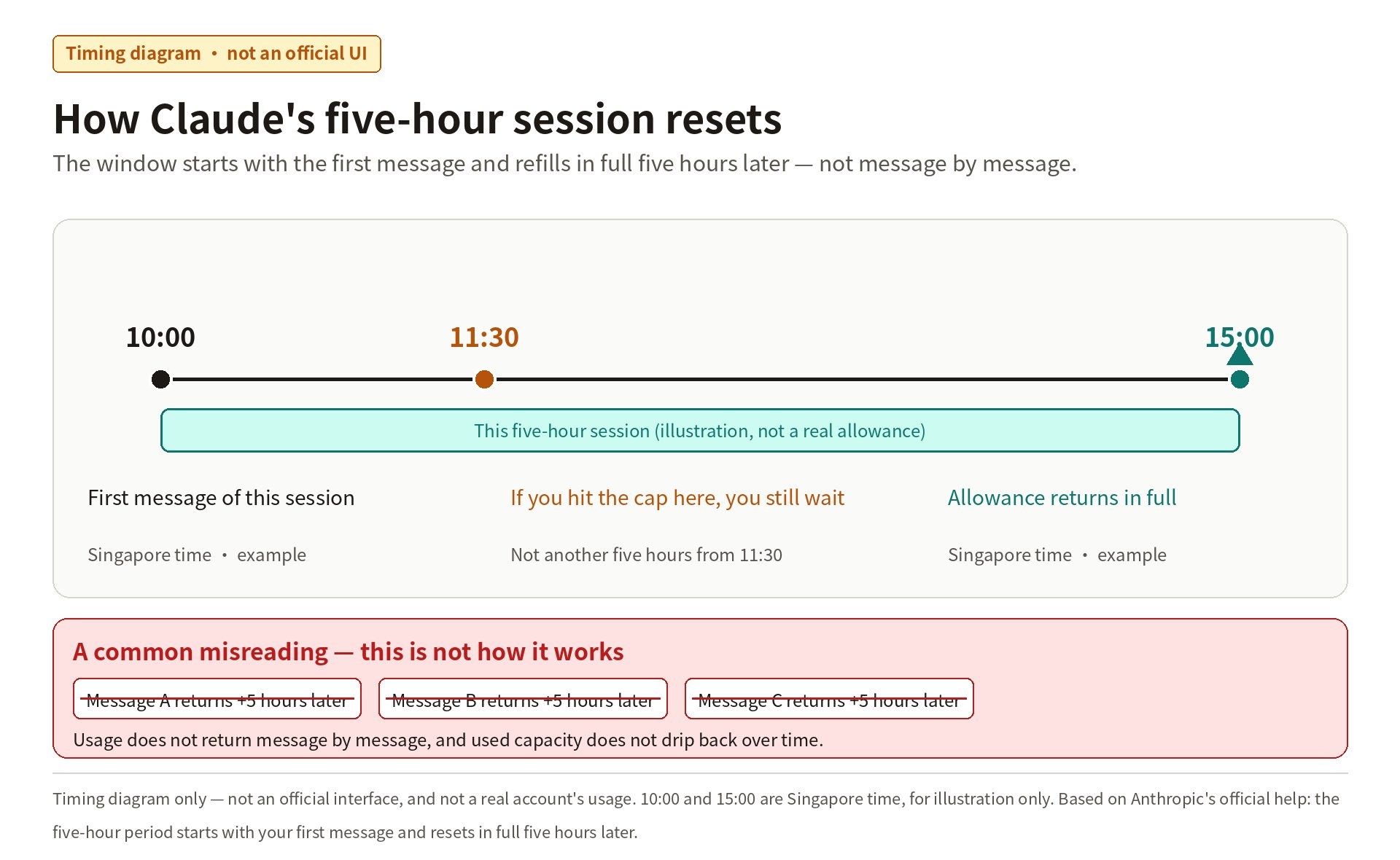
Timing diagram only — not an official interface, and not a real account's usage. 10:00 and 15:00 are Singapore time, for illustration only. Based on Anthropic's official help: the five-hour period starts with your first message and resets in full five hours later.
Paid plans also have weekly limits that reset at a fixed time assigned to your account. You receive the full weekly allowance each cycle, and that day and time do not change because you only started using Claude today. Some higher-tier plans may have no five-hour limit, or an extra weekly cap on a particular model; check Settings > Usage.
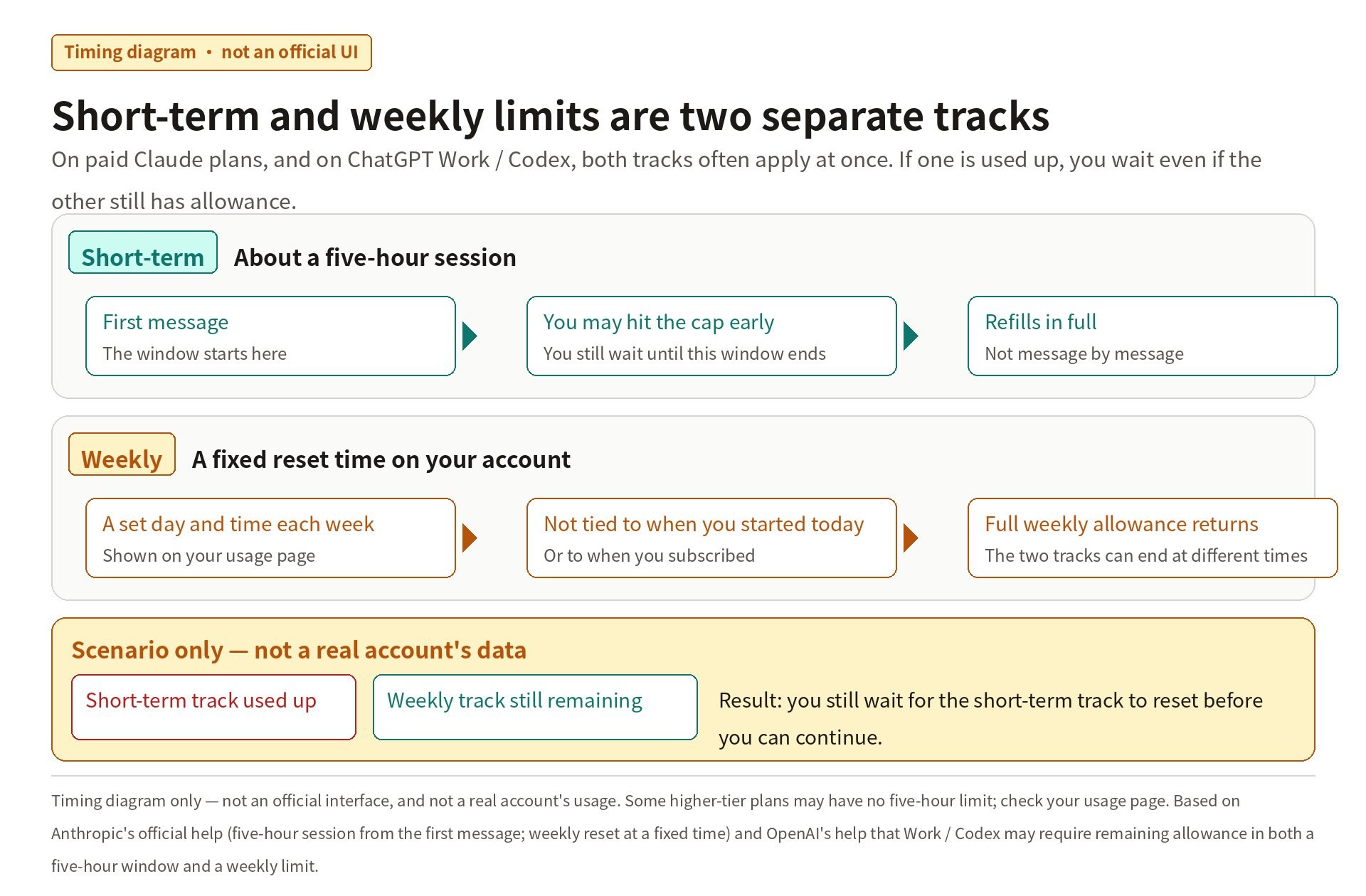
Timing diagram only — not an official interface, and not a real account's usage. Based on Anthropic's official help (five-hour session from the first message; weekly reset at a fixed time) and OpenAI's help that Work / Codex may require remaining allowance in both a five-hour window and a weekly limit. Some higher-tier plans may have no five-hour limit; check your usage page.
Official help does not publish a fixed message count. How much you use depends on message and attachment length, how long the current conversation already is, the model, the effort level, and tools or multi-step work such as search, Research, running code, or creating files. Longer chats that trigger automatic context management also use more of the limit. Switching models or starting a new chat does not clear usage you have already spent; if you have moved to a new topic, a new chat is often more economical. If you upgrade, the new plan's limits apply immediately.
Subscription chat and Claude Code are counted separately from the Claude API. Monthly API credits included with a plan can be used on the API; they do not increase usage in the Claude apps or Claude Code. Paid plans can also enable extra credits, which let you continue at standard API rates after the included limits are reached. Those charges are separate from both the subscription and the monthly API credits. You can also wait for a reset, or use an official limit reset if one is shown in Settings > Usage.
ChatGPT: treat regular Chat as separate from Work and Codex, for now
For now, regular Chat is separate from Work and Codex. Check remaining allowance and reset times in Settings → Usage.
In regular Chat, everyday text chats on free and entry-level plans are typically unlimited, subject to abuse-prevention safeguards. File uploads, image generation, voice, data analysis, and other tools have separate limits; ChatGPT shows the reset time in the product when you reach one. Paid plans include higher model limits, but may still have message caps, especially during high demand. Some advanced thinking options or advanced models have their own limits. Switching models does not restore allowance in a shared pool. Official help pages do not publish a fixed message count. OpenAI Support also cannot manually reset ChatGPT or Codex limits.
OpenAI has announced that, starting in December 2026, usage on some paid plans will be shared across ChatGPT and Codex and measured in tokens. More advanced models and complex tasks will generally use more of the allowance. Instant chat will not draw from that usage. When the change takes effect, rely on the combined remaining usage and reset times in Settings → Usage.
Work and Codex share the usage allowance included with your plan. That allowance is not a fixed number of messages or tasks. Many paid plans have both a five-hour window and a weekly limit; you need allowance remaining in both to continue. A new five-hour window starts when you send your first Work or Codex message after the previous window ends. You may reach the five-hour limit before five hours have passed, even if weekly usage remains. Some higher-tier plans currently have no five-hour usage limit in Work and Codex, but they still have an included allowance. Cloud tasks may use more, and weekly limits still apply.
Eligible personal paid accounts may be able to buy an instant reset or use a reset issued by OpenAI. These can change the next refresh time, so check Usage. API usage is billed separately at API rates. API credits included with a ChatGPT subscription, where available, do not increase ChatGPT or signed-in Codex usage limits.
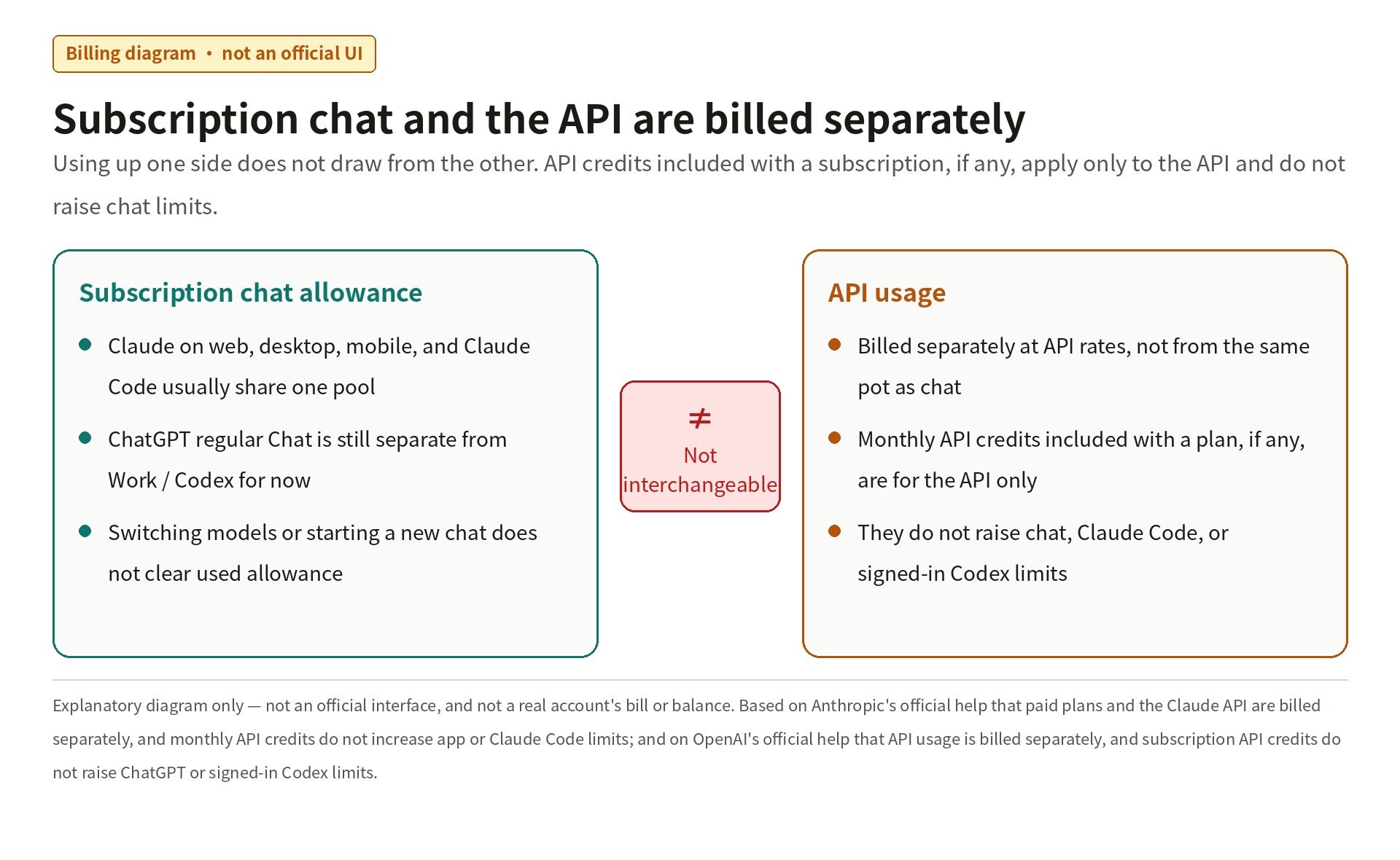
Explanatory diagram only — not an official interface, and not a real account's bill or balance. Based on Anthropic's official help that paid plans and the Claude API are billed separately, and monthly API credits do not increase app or Claude Code limits; and on OpenAI's official help that API usage is billed separately, and subscription API credits do not raise ChatGPT or signed-in Codex limits.
Gemini, briefly
Google's official wording is that Gemini Apps use compute-based limits that factor in prompt complexity, the models and features you use, and chat length. The limit refreshes every 5 hours until you reach the weekly limit. Official help does not publish a fixed message count. When you reach a limit, check the refresh time in Settings → Usage Limits. Google does not describe the five-hour refresh in the same first-message, full-refill terms as Claude, so do not assume the mechanisms are identical; use the on-screen countdown.
If you hit a limit, wait for the reset, switch to another model or feature that is still available, or use an official upgrade, credit, or reset option. There is no reliable way to bypass a usage limit.
Checked on 21 November 2026 (Singapore time). The in-article images are explanatory diagrams, not official usage interfaces, and not real account data. Rules may change; rely on each product's usage page and the official help current at the time.
For related products on this site, plan details are as shown on the product pages.
Claude account or subscription ChatGPT account or subscription