
Author: Vaibhav (VB) Srivastav (@reach_vb) —— OpenAI employee
Original link: https://x.com/reach_vb/status/2038670509768839458 (published March 30, 2026)
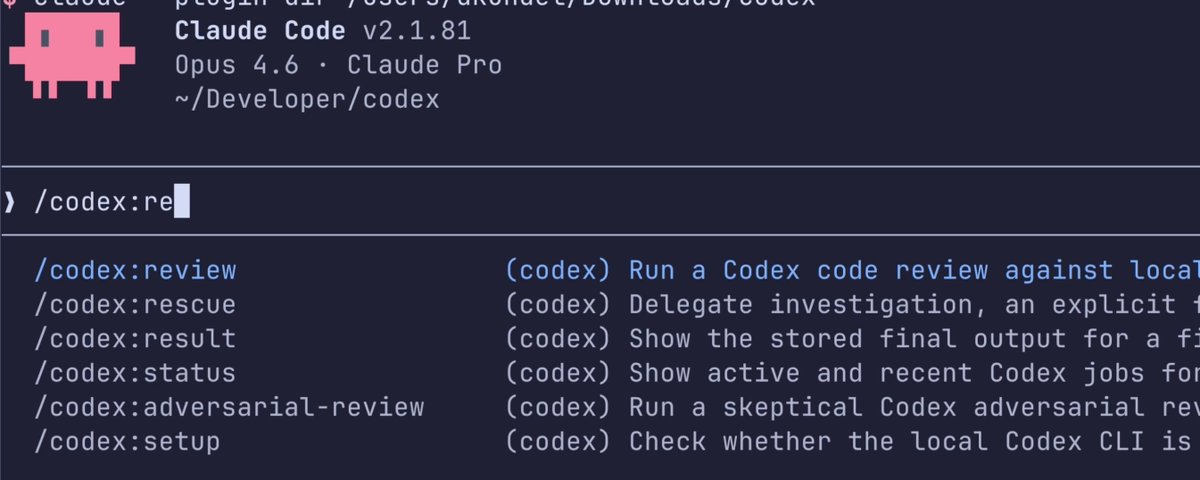
This plugin has three core uses: a regular Codex review, a more skeptical adversarial review, and handing the task directly off to Codex when you want another AI agent to take over.
Setup
Plugin address: https://github.com/openai/codex-plugin-cc
You will need: a ChatGPT subscription (the free tier included) or an OpenAI API Key, plus Node.js 18.18 or higher.
If Codex is not yet installed:
(here the original article shows a screenshot of the installation command)
If Codex is installed but not yet authenticated:
(here the original article shows a screenshot of the authentication command)
Core commands
/codex:review—— Runs a standard read-only Codex review./codex:adversarial-review—— Runs a steerable, skeptical challenge review. Use it when you want Codex not just to check the code, but to question the implementation logic./codex:rescue—— Hand the task directly off to Codex.
Long-running tasks can run in the background, managed through the following commands:/codex:status, /codex:result, /codex:cancel
A simple first-run example:
(here the original article shows a screenshot of the first-run interface)
When to use it
The core value lies in this: without leaving Claude Code, you get a genuine second opinion from a different AI agent.
The recommended default usage pattern is very simple:
- Run
/codex:review - For any high-risk task, run
/codex:adversarial-review - When the conversation gets stuck or you want Codex to take over, use
/codex:rescue
Adversarial review is especially well suited to: code migrations, permission changes, infrastructure scripts, refactoring, and any scenario where “hidden assumptions” are more dangerous than “obvious syntax errors.”
How it works
The plugin makes delegated calls through the local Codex CLI and the Codex app server. As a result, it directly uses your existing local authentication, configuration, environment, and MCP settings.
That is why it feels so lightweight. It is not a separate runtime; it is just Codex, only invoked from inside Claude Code.
Optional review gate
You can also enable a review gate:
(here the original article shows a screenshot of the command to turn on the review gate)
It can prevent Claude Code from exiting before the Codex review is complete. Very useful, but use it with caution——it may form a long Claude/Codex loop and burn through your usage quota quickly.
Bottom line
This plugin is a simple way to stay in your Claude Code workflow while continuing to use Codex where Codex excels.
After installing, run /codex:setup, make /codex:review your default second-opinion command, and then use /codex:adversarial-review or /codex:rescue when you need a deeper review.
Once more, the plugin address: https://github.com/openai/codex-plugin-cc
In one sentence: this is the official bridge plugin built for developers who use Claude Code + Codex together, letting the two AI models complement each other's strengths and making coding work more efficient and safer.
You can purchase Codex and Claude Code on this site's homepage! Welcome!