
How to Sign Up for World App?
In the age of artificial intelligence, the need to distinguish humans from robots is becoming increasingly urgent. World App is a mobile application developed by Tools for Humanity. It is not just a digital wallet, but the gateway to the World Network. Through World App, you can securely store your World ID (a privacy-preserving digital proof of identity), proving that you are a unique, real human, and thereby access human-exclusive services such as concert tickets, dating apps, or financial systems. At the same time, it supports storing and sending digital assets, including Bitcoin, Ethereum, and Worldcoin tokens (in available regions).
At the core of World ID is iris scan verification performed through the Orb device, which confirms your uniqueness rather than your personal identity information. This means your privacy is protected, and after verification you only need to store the proof on your phone to use it. If you are interested in security and the fair distribution of benefits in the AI era, signing up for World App is a worthwhile starting point. This article will guide you step by step on how to register and set it up.
Prerequisites for Registration
Before you begin, please make sure:
- You have an iOS or Android smartphone.
- Your device's system version supports the App Store or Google Play (iOS 12+ or Android 7.0+).
- You are located in a region that supports World ID verification (currently covering many countries, but Worldcoin tokens are not available in restricted regions such as the United States).
- If there is an Orb device (a spherical scanner) nearby, the verification process is faster; otherwise, you can use the “Add Credential” option (face scan, available in some regions).
- Note: The Worldcoin project aims to expand globally, but please check for in-app updates regularly to confirm local availability.
- [World App screenshot]
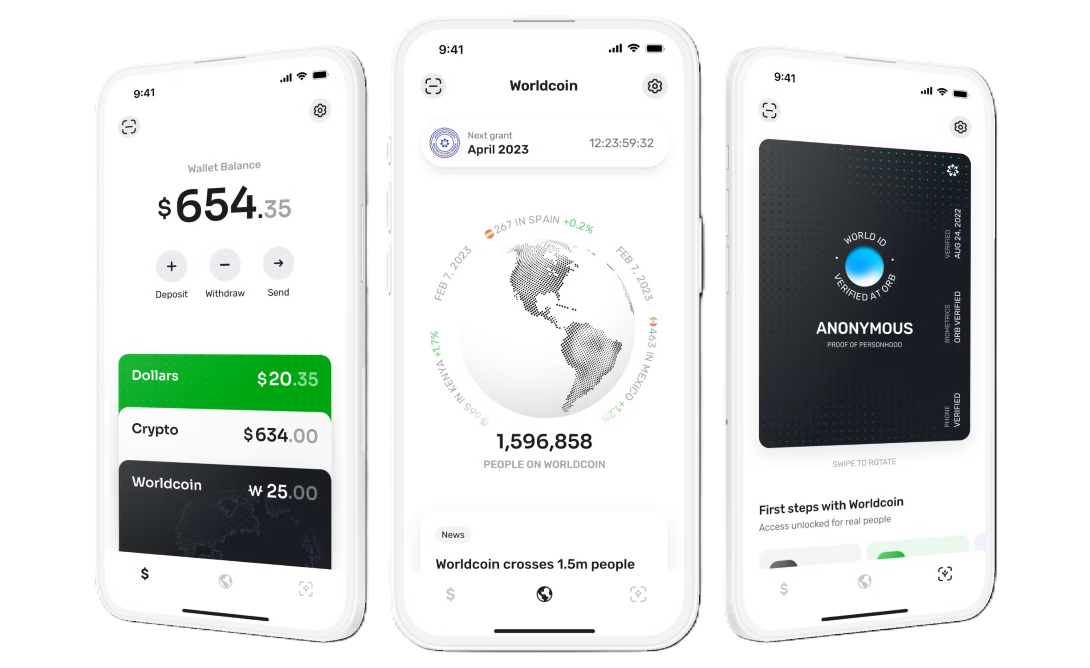
Detailed Registration Steps
The registration process is simple and usually takes only a few minutes. Below is the standard procedure:
Step 1: Download World App
- Open your phone's app store:
- iPhone users: Go to the App Store, search for “World App” or visit the App Store link directly. (Downloading requires an Apple ID from a region other than mainland China. If you don't have one, please purchase one on this site! (click to go directly))
- Android users: Go to Google Play, search for “World App” or visit the Google Play link directly.
- Tap “Download” or “Install” and wait for the installation to complete.
- After installation, open the app. You will see a welcome screen that introduces the features of World App, such as World ID verification, asset management, and Mini Apps. (Users in mainland China need to use a VPN network.)
Step 2: Create an Account and Start Verification
- On the app's home page, tap the “World ID” tab (usually located in the bottom navigation bar).
- Follow the prompts to create a new account:
- Enter your email address (optional, used for recovery but not for identity verification).
- Set a secure PIN code or enable biometrics (such as fingerprint/face unlock).
- The app will guide you to choose a verification method:
- Preferred: Visit an Orb device. Use the in-app map to find the nearest Orb operator location (free scan, usually in public places). Once you arrive, scan your iris (it only takes a few seconds), and the Orb will confirm that you are unique. Due to restrictions in China and some other countries, Orb devices are only available in World stores in certain countries. Please go to the World official website to find a World store location (click to go directly). The blogger found a World store in Kuala Lumpur, Malaysia, and recorded a video.
- [World store exterior]

- [World store interior]
- Alternative: Add Credential. If an Orb is not available, choose “Add Credential” to perform face scan verification (available in expanded regions). Follow the on-screen instructions and complete it using your phone's camera.
Step 3: Complete Verification and Activate
- After successful verification, your World ID will be securely stored in the app (no need to upload it to the cloud).
- Return to the app and confirm that your World ID has been activated. You can now:
- Log in to websites or apps that support World ID (such as certain dApps or services).
- Claim Worldcoin grants (if available; you need to log in to the App regularly to claim them).
- Explore other features, such as sending cryptocurrency or using Mini Apps.
- If you encounter any problems, check your network connection or update the app version.
The entire process emphasizes privacy: World ID only proves that “you are a human” and does not reveal your name, location, or any other personal information.
Frequently Asked Questions
- Is there a fee to register? Free! Both Orb verification and App download are free of charge.
- What if there is no Orb? The App will show a waiting list or alternative verification options. Please check for updates regularly, as the World project is expanding its global coverage.
- Is it safe? Yes, iris data is processed locally and deleted immediately. World App uses end-to-end encryption to protect your assets.
- Can I get Worldcoin? In supported regions, yes. However, please note that the token value is highly volatile and cannot be used in restricted countries (such as the United States).
- What if I forget my PIN? Reset it using your registered email, or contact support ([email protected]).
Notes and Tips
- Privacy and Compliance: World App is maintained by Tools for Humanity, ensuring compliance with global data protection regulations. Verification is used only to prove human identity and does not involve KYC (identity verification).
- Potential Risks: As discussed by Reddit users, avoid third-party “proxy registration” services to prevent scams. Always download from the official App Store.
- Updates and Expansion: The World Network is iterating rapidly and will support more wallets and applications in the future. We recommend enabling App notifications to receive grant reminders.
- If you are in a specific country (such as Malaysia), local availability may be limited; please refer to the official help center.
Signing up for World App is not just the beginning of obtaining a digital identity, but also an opportunity to participate in a fair ecosystem in the AI era. Download it now and start your World ID journey! If you have any questions, feel free to visit the World official website or the in-app help.
This article is based on the latest information as of October 2025; please refer to official sources for accuracy.