Product introduction: Education email verification for Google One (your own account or a new account)

Product purpose:
1️⃣Please first check whether you are eligible for the education discount, i.e. whether Google One can be paid for. Some node IPs may show as ineligible — please switch your node IP and refresh the page to try again.
2️⃣If you are willing to use the Google email we provide, please order this product (https://5buyai.com/buy/88) first, then come back and order the education email verification.
3️⃣After ordering, we will send you an education email. Once verified, add a VISA or MasterCard (domestic cards work) and you can enjoy the 15-month education discount.
4️⃣If you do not have a VISA or MasterCard, you can use the card we provide. Order this product (https://5buyai.com/buy/20, just select the first-time card issuance fee option) first, then come back and order this product (education email verification)!
For details, see: Logging in and binding Duo Mobile (applicable to SJSU and other schools)
Google One education discount verification process:
①This product (education email) only serves as the email for receiving the education discount verification code. If you need the Google One 15-month discount, you must prepare a new Google account (and it must be able to use Gemini and upgrade to Gemini Advanced — purchase URL: https://5buyai.com/buy/54). Please confirm the above requirements before verification, because verification can only verify one unique Google account.
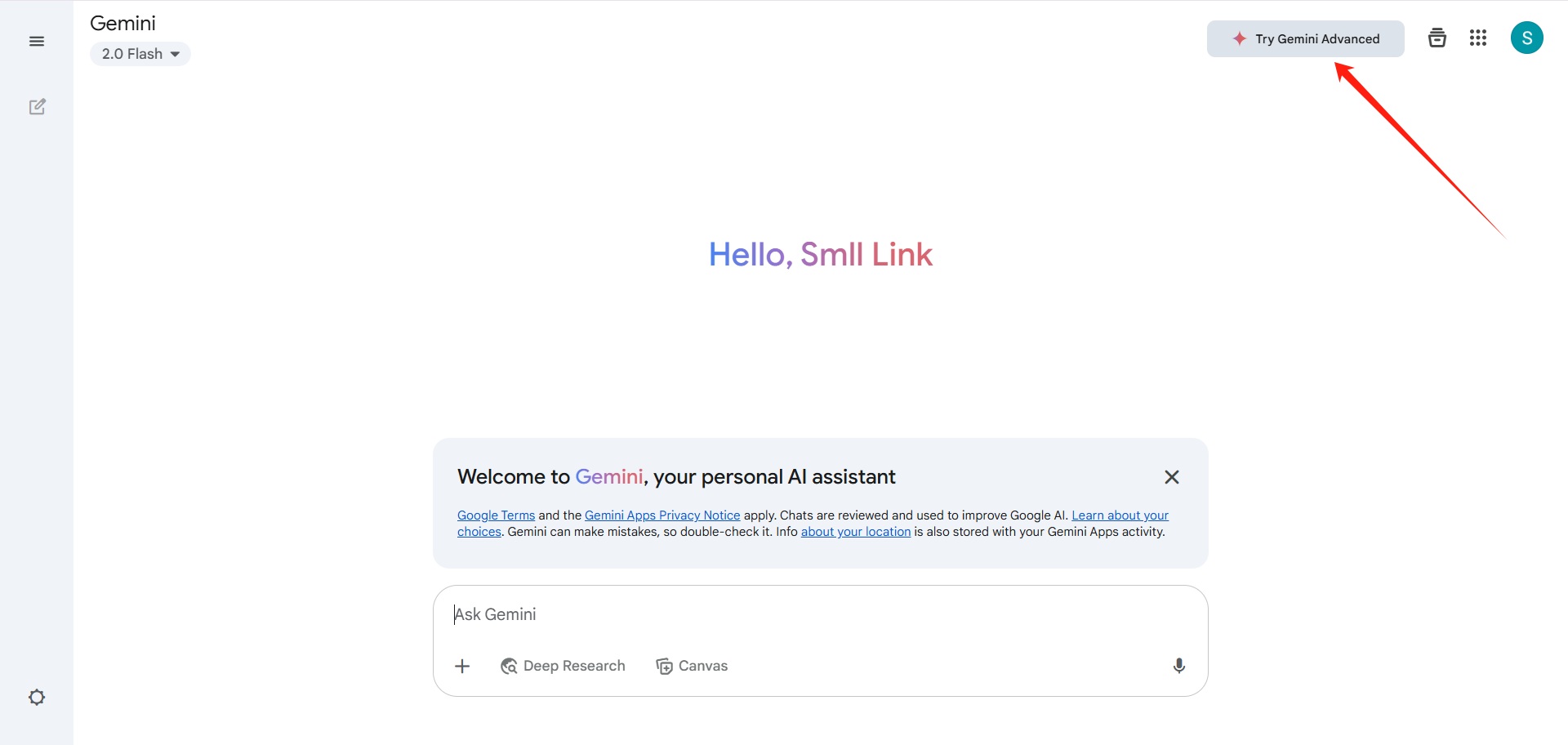
First, please confirm your network is set to the US. After logging in to the new Google account, go to the Gemini website and click the Try Gemini Advanced button, as shown below:
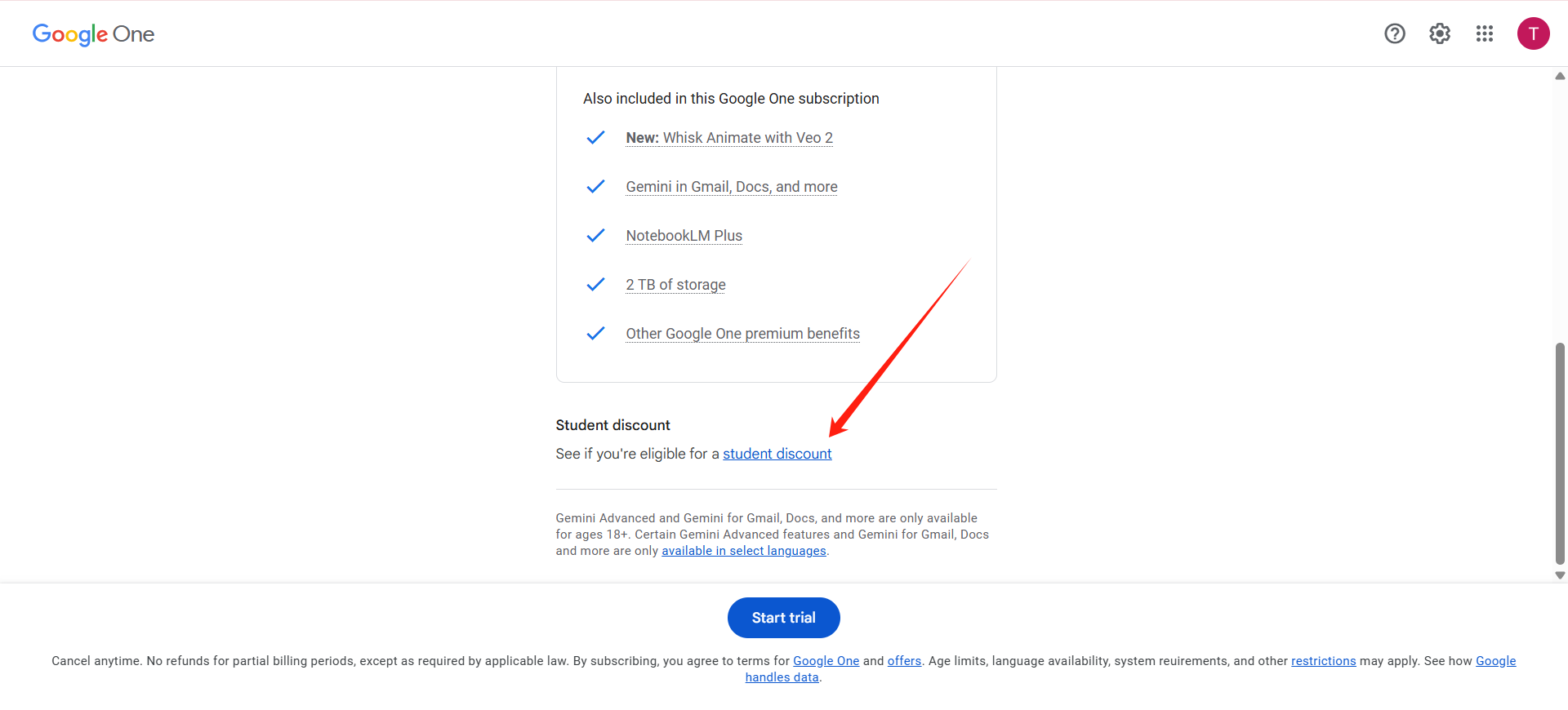
After entering the Upgrade Advanced page below, scroll the page down to the bottom and click students discount, as shown below:
After entering the student verification page, follow the instructions to reach the student email verification page, fill in this product (education email), receive the verification code on this product's (education email) inbox page, and you will successfully verify the Google One 15-month education discount. Then perform the card binding (if you do not have a foreign-currency credit card, you can purchase one on this site, URL: https://5buyai.com/buy/20) and you will successfully obtain membership. To confirm whether you have obtained the 15-month education discount, please open the payments and subscriptions page on Google Play, where you can see the subscription expiration date.
SuperGrok education discount verification process:
First, please confirm your network is set to the US. Please directly use this product (education email) to register a Grok account, then perform the card binding (if you do not have a foreign-currency credit card, you can purchase one on this site, URL: https://5buyai.com/buy/20) and you will successfully obtain SuperGrok membership.
Note: Due to policy changes, SuperGrok may not necessarily be verified successfully with this education email, please be aware!
Accounts, subscriptions and top-ups for ChatGPT, Claude, Midjourney, Gemini, Grok and other major AI tools.
The product will be shipped manually. After successful payment, the account or card code will be sent to your order email address during working hours.You can view them anytime on the order lookup page by order number, email or browser cache.
Alipay, WeChat Pay, USDT, and Credit Card payments. Credit card payments require first topping up your balance, and then using the balance to purchase products.
No. You can check out as a guest and receive items by email; registering lets you manage orders, balance and invoices in one place.
All prices are listed in Chinese Yuan (¥). When paying with USDT the amount is converted automatically at the live rate.
Yes. After-sales help is available via live chat or the order dispute page.
Please click the chat widget at the bottom-right corner to reach us and leave your email or other contact details. We will get back to you as soon as possible.
Important notice: Due to attacks on this site, to protect your interests and those of AIFUNS, please verify the payment merchant is:宇柒云阁 (Yuqi Yunge)
Note: If you find the payment processing fee high, you can contact the AIFUNS team directly and pay the original price via an Alipay password red packet. When paying with Alipay, please turn off your VPN and stay on a domestic (China) network. If you cannot complete the payment, you can click  to chat with the AIFUNS team (bottom-right corner).
If you have a credit card, you can register an account on this site, use your credit card to top up your balance in the personal center, and then use the balance to pay for purchasing our products or services.