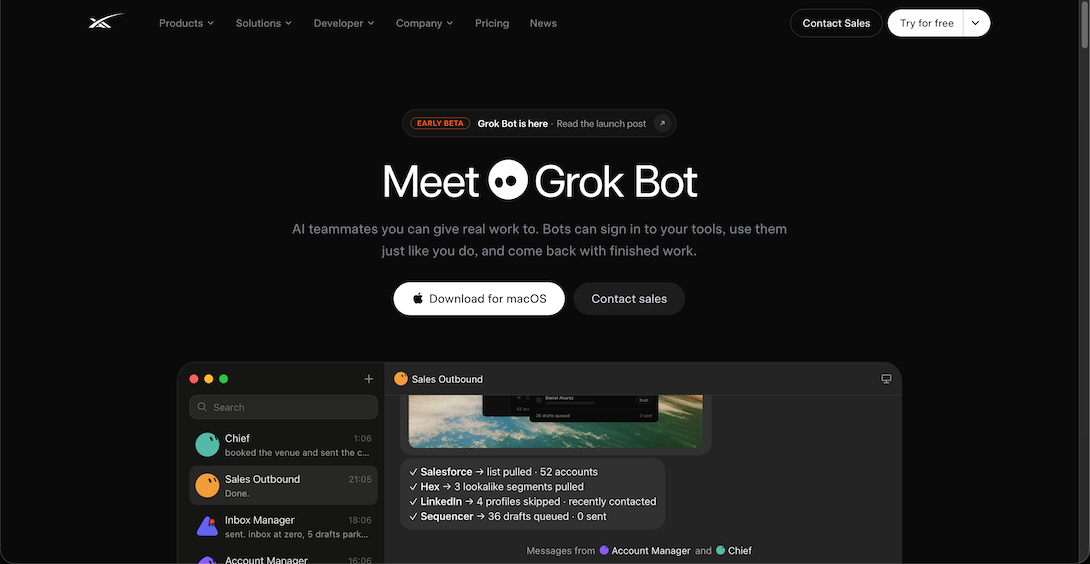
Grok Bot is an early beta xAI launched on 11 August 2026, positioned as an "AI teammate". It isn't an ordinary chatbot but an AI colleague that actually does the work:
Its own cloud computer: every Bot works on a cloud machine and keeps going 24/7 even when your computer is off.
Signs in to the real tools you authorise — Gmail, Google Sheets, Salesforce, LinkedIn, Zendesk and more — and operates them like a person.
Multi-step jobs: clean up data, follow up emails, update sheets, research lists, then hand back the result.
Several Bots together: named Bots on one account share files and sign-ins on the cloud computer and work in parallel.
Which plan to choose
Grok Bot signs in with a Cursor account and usage is billed to Cursor (Cursor was acquired by SpaceX, xAI's parent).
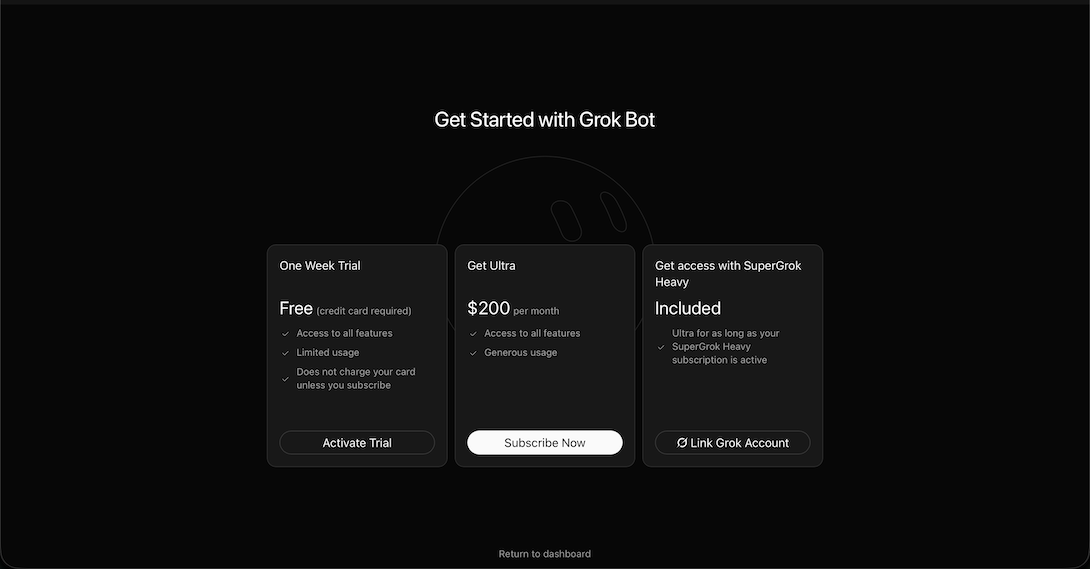
According to xAI, during the beta Grok Bot is included in SuperGrok Heavy, Cursor Ultra and Cursor Team (Premium seats); check the latest official information for other plans, or ask support before ordering.
Create a Bot: name it and describe its job, e.g. "Sales assistant: tidy new leads every day".
Authorise tools: sign in to the sites and accounts it needs on its cloud computer, granting only what's necessary.
Assign tasks in plain language with the output format; tasks can repeat on a schedule.
Review: the Bot reports progress and hands back results, and you can watch its screen at any time.
Tips
Start with small, clear tasks before giving it more freedom.
Ask it to confirm before sending emails, paying or deleting data.
It's a beta that changes fast — follow the official docs.
[Grok Bot website]
[Grok Bot prices]
Check before buying
Grok Bot signs in with Cursor and is included only in some plans during the beta — ask support first.
No after-sales for accounts; membership refunds need a refund-email screenshot.
Grok official tools
Made by xAI and wired into X. Use it on the web, in the mobile apps or inside X; Grok Bot is an AI teammate that works on its own computer, and Grok Build is a coding agent. One subscription covers both Grok and Cursor.
Assign work like you would to a teammate: each Bot has its own computer, signs in to your tools, works the way you do and checks in when it needs approval.
Premium and upDesktop · Mobile
Where
Download for macOS at x.ai/bot, or message Bots on iOS
Compiled by 5buyai from official websites, directories and GitHub repositories — not an official page; plan details follow the official terms · Plans checked 2026-10-21
Sign-in guide
① Download Grok Bot (desktop and iOS) from the Grok Bot website and sign in with your Cursor account.
② Enter the Cursor account and password to finish signing in.
How it is delivered
🙋 Manual delivery⏰ Working hours UTC+8 09:00–21:00📧 Sent to your order email, also viewable once on the order page
Buy a new account
Nothing needed from you — just wait for delivery after paying.
For: Account, Team monthly (Standard seat, Cursor), Team monthly (Premium seat, Cursor), Plus monthly membership, Premium monthly membership, Super monthly membership, Ultra monthly membership, Team monthly (Ultra seat, Cursor), Super monthly membership (Offical 50% Price)
Recharge my account
After paying, provide on the order page: Account, Password, Notes (optional)
For: Team monthly (Standard seat, Cursor), Team monthly (Premium seat, Cursor), Plus monthly membership, Premium monthly membership, Super monthly membership, Ultra monthly membership, Team monthly (Ultra seat, Cursor), Super monthly membership (Offical 50% Price)
Other
Nothing needed from you — just wait for delivery after paying.
For: Price-difference top-up
After-sales policy
① No after-sales support for accounts!
② For memberships, send support a screenshot of the refund email for verification; we refund the remaining days of the price paid minus a ¥10 fee. (Example: Pro monthly bought for ¥165 and banned after 7 days: (165 − 10) ÷ 30 × (30 − 7) = ¥119.)
What AI services does 5buyai.com support? Can I get an invoice?
Accounts, subscriptions and top-ups for ChatGPT, Claude, Midjourney, Gemini, Grok and other major AI tools. Invoices are available for AI orders paid in Chinese yuan (CNY).
How do I receive my order after paying?
Orders are delivered manually: after successful payment, the account or card code is sent to your order email during working hours (9:00–21:00, UTC+8). You can check your order details anytime on the order lookup page by order number, email or browser cache.
What payment methods are supported?
Alipay, WeChat Pay, USDT, and Credit Card payments. Credit card payments require first topping up your balance, and then using the balance to purchase products.
Do I need an account to buy?
No. You can check out as a guest and receive items by email; registering lets you manage orders, balance and invoices in one place.
Are prices shown in CNY?
All prices are listed in Chinese Yuan (¥). When paying with USDT the amount is converted automatically at the live rate.
Is there after-sales support?
After-sales support is available for some products, handled via live chat or the order dispute page. Accounts are virtual products: once delivered, no refunds are given unless there is an after-sales issue. CNY refunds and USD refunds are only made back to the original payment method, and USDT refunds are only made on the BSC network.
I am a business buyer and need to make a bulk purchase. How can I get in touch?
Please click the chat widget at the bottom-right corner to reach us and leave your email or other contact details. We will get back to you as soon as possible.
★ 51 reviews
229***@qq.com★★★★★· Super monthly membership (Offical 50% Price)2026-10-18
非常感谢,客服特别耐心
Seller reply: 谢谢亲
Disclaimer
This is an independent third-party platform, not affiliated with, endorsed by, or authorized by any brand mentioned. We do not host any third-party login page and do not collect third-party credentials.


 Grok official tools

