Devin.ai, built by Cognition, is an autonomous AI software engineer that plans, writes, debugs, and delivers coding task...
About this product
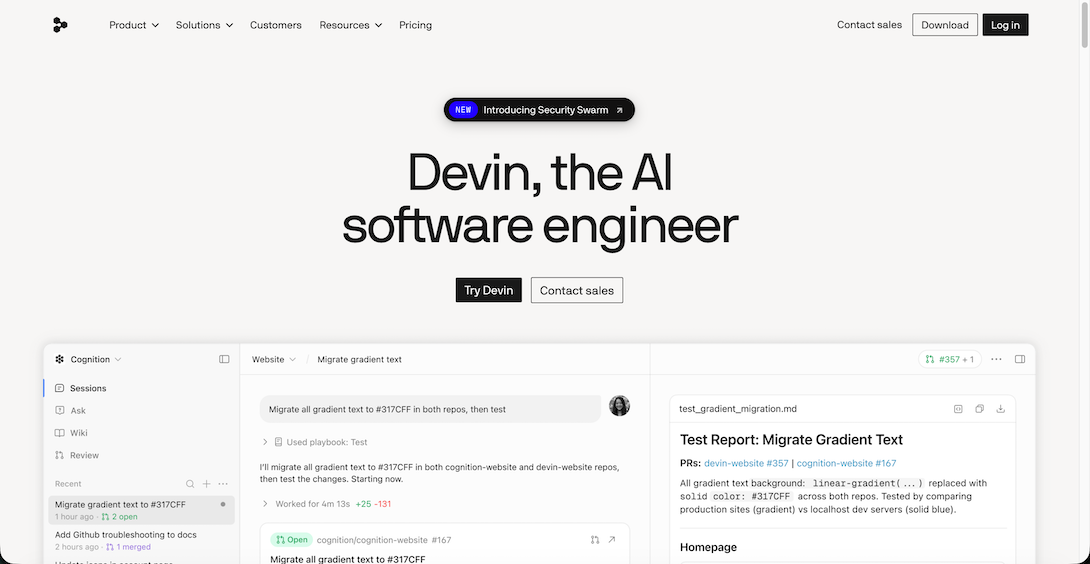
Devin, built by Cognition, is billed as "the first autonomous AI software engineer": hand it a development task and it reads code, writes code and runs tests in its own cloud environment, then opens a pull request for you to review. Cognition acquired the AI editor Windsurf in July 2025, and in June 2026 Windsurf was renamed Devin Desktop. One account now includes:
Devin Desktop (formerly the Windsurf editor): a local AI code editor with unlimited Tab completions and an AI coding agent.
Devin cloud agents: hand bigger tasks to autonomous agents in the cloud and run several at once.
DeepWiki: auto-generated, chat-able documentation for code repositories, to understand unfamiliar projects fast.
Which plan to choose
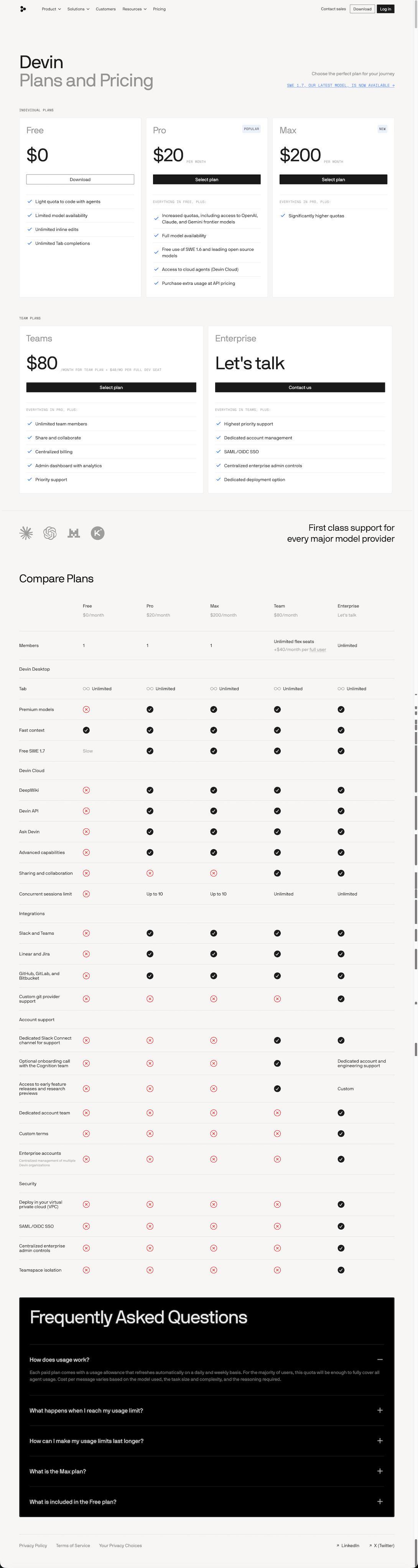
To try it: the free "Account" — a small agent allowance and unlimited Tab completions.
Everyday development: Pro monthly, with access to all models.
Heavy use and lots of cloud Devin tasks: Max monthly.
With / without warranty: the warranty version is covered by after-sales during the plan; the no-warranty version is cheaper. See Devin's pricing page for exact limits.
What Devin can do for you
Editor · Beginner
Code in Devin Desktop
The former Windsurf editor, with Tab completions and an AI agent.
Download and install Devin Desktop (formerly Windsurf) and sign in
Open your project folder and press Tab to accept completions as you type
Describe a task in the AI panel and let the agent edit across files
Try asking
Add a dark-mode toggle to this React project and remember the user's choice.
Autonomous · Advanced
Hand tasks to cloud Devin
Fix bugs, add features or upgrade dependencies — it opens a PR when done.
Connect your GitHub repository at app.devin.ai
Start a session and describe the task and how to judge it is done
Devin opens a PR when finished; review and merge it
Try asking
Upgrade axios to the latest version, fix every incompatible call and make sure all tests pass.
Read · Intermediate
Understand repos with DeepWiki
Generates docs for a repository you can ask questions about.
Replace github.com with deepwiki.com in the repository URL and open it
Read the generated architecture docs
Ask questions right on the page
Try asking
How does this project's plugin system load plugins? Start from the entry point.
Download Devin Desktop from the Devin website after signing in (Windows, macOS and Linux) and sign in with the same account.
Open a project folder and press Tab to accept completions as you type.
Chat with the agent in the sidebar; it edits multiple files and runs commands, and you approve each step.
Hand off to cloud Devin: connect a GitHub repository on the web, assign a task (e.g. "fix this issue"), and Devin opens a PR when done.
Read projects with DeepWiki: open the repo's DeepWiki page and ask "Where is the login logic?"
Tips
Give cloud Devin a clear goal, acceptance criteria and relevant files for better results.
Split big jobs into small PRs that are easy to review.
Grant access only to the repositories it needs.
[Devin.ai website]
[Devin plans and prices]
Check before buying
Sign-in needs email confirmation — read it on your order page.
Warranty and no-warranty options are priced differently.
Devin (formerly Windsurf) official tools
An AI software engineer from Cognition. Devin has its own cloud computer, writes and tests code and opens pull requests; the former Windsurf editor is now Devin Desktop, alongside a CLI, code review and DeepWiki.
Compiled by 5buyai from official websites, directories and GitHub repositories — not an official page; plan details follow the official terms · Plans checked 2026-10-22
Sign-in guide
① Open Devin.ai in your browser and sign in with the credentials delivered with your order.
② After you enter the account, Devin.ai sends a confirmation email to the included mailbox, which you can read directly on your order page.
How it is delivered
🙋 Manual delivery⏰ Working hours UTC+8 09:00–21:00📧 Sent to your order email, also viewable once on the order page
Buy a new account
Nothing needed from you — just wait for delivery after paying.
For: Account, Pro monthly membership, Max monthly membership
Recharge my account
After paying, provide on the order page: Account, Password, Notes (optional)
For: Pro monthly membership, Max monthly membership
What AI services does 5buyai.com support? Can I get an invoice?
Accounts, subscriptions and top-ups for ChatGPT, Claude, Midjourney, Gemini, Grok and other major AI tools. Invoices are available for AI orders paid in Chinese yuan (CNY).
How do I receive my order after paying?
Orders are delivered manually: after successful payment, the account or card code is sent to your order email during working hours (9:00–21:00, UTC+8). You can check your order details anytime on the order lookup page by order number, email or browser cache.
What payment methods are supported?
Alipay, WeChat Pay, USDT, and Credit Card payments. Credit card payments require first topping up your balance, and then using the balance to purchase products.
Do I need an account to buy?
No. You can check out as a guest and receive items by email; registering lets you manage orders, balance and invoices in one place.
Are prices shown in CNY?
All prices are listed in Chinese Yuan (¥). When paying with USDT the amount is converted automatically at the live rate.
Is there after-sales support?
After-sales support is available for some products, handled via live chat or the order dispute page. Accounts are virtual products: once delivered, no refunds are given unless there is an after-sales issue. CNY refunds and USD refunds are only made back to the original payment method, and USDT refunds are only made on the BSC network.
I am a business buyer and need to make a bulk purchase. How can I get in touch?
Please click the chat widget at the bottom-right corner to reach us and leave your email or other contact details. We will get back to you as soon as possible.
No reviews yet — be the first to review after your purchase.
Disclaimer
This is an independent third-party platform, not affiliated with, endorsed by, or authorized by any brand mentioned. We do not host any third-party login page and do not collect third-party credentials.
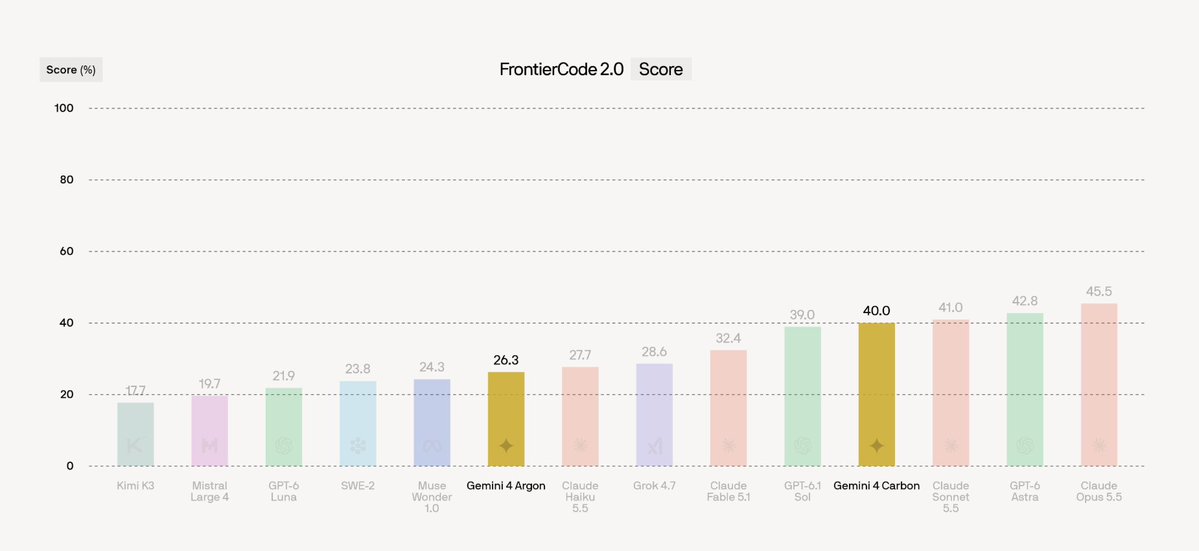
We've evaluated Gemini 4 Carbon and Gemini 4 Argon on FrontierCode 2.0, our coding benchmark that measure's a model's ability to go beyond the spec.
Gemini 4 Carbon scores near SOTA with a score of 40% and a cost of $4.04 per task, behind Claude Opus 5.5, GPT-6 Astra, and Claude


 Devin (formerly Windsurf) official tools