Telegram is a fast, privacy-minded messaging app with large groups, channels, encrypted chats, bots, and cloud sync, pop...
About this product
Telegram (also called TG) is a messaging app known for being secure, fast and feature-rich. It supports text, voice and video calls and end-to-end encrypted "secret chats"; you can create groups of up to 200,000 members and channels with unlimited subscribers, share files up to 2 GB, and keep messages synced in the cloud. It is free on phones, computers and the web, and is widely used for personal chat, community management and publishing.
Telegram Premium:
Upload files up to 4 GB and download faster
Voice-to-text and translation of whole chats
No sponsored messages in channels
Doubled limits for channels, folders and pinned chats, and up to 4 accounts in one app
Exclusive stickers, reactions, emoji statuses and a Premium badge
We offer: new accounts (with sign-in help), or 3-, 6- or 12-month Premium on your own account (we only need your username).
⚠️ Before you buy
① We recommend signing in on an iPhone; other devices may fail to sign in.
② Three things to do once you have the account (wait 24 hours after first signing in, as acting sooner easily gets the account banned):
Sign out all other devices: Settings → Devices → Terminate All Other Sessions (after this, the code-receiving API in your delivery can no longer be used).
Turn on two-step verification, adding a password to sign-in so nobody can sign in with the phone number alone: Settings → Privacy and Security → Two-Step Verification.
Bind an email so you can still sign in if you lose your only signed-in device (we recommend a major provider such as Gmail — available in our shop): Settings → Privacy and Security → Login Email.
To move to another device or sign in to the same account elsewhere, follow the sign-in guide.
Text, voice and video calls, with end-to-end encrypted secret chats and self-destructing messages.
Open the chat and tap the contact's picture to see their profile
Choose "Start Secret Chat" from the "More" menu
In a secret chat you can set a self-destruct timer for messages
Community · Intermediate
Run groups and channels
Groups of up to 200,000 and channels with unlimited subscribers for communities and news.
Tap the new message button and choose "New Group" or "New Channel"
Set the name, picture and public link
Assign permissions in the admin settings and add moderation bots
Files · Beginner
Big files and cloud storage
Files up to 2 GB (4 GB with Premium), synced in the cloud and available on every device.
Tap the paperclip icon in a chat to send a file
Send important files to Saved Messages to use it as cloud storage
Sign in to the same account on your computer to access them anytime
Tools · Intermediate
Automate with bots
Bots for alerts, translation, downloads and group admin — just search their @name.
Type the bot's username in search, e.g. @BotFather
Tap Start to launch the bot
Follow the menu the bot shows you
Premium · Beginner
Premium extras
4 GB files, voice-to-text, chat translation, no ads, and more accounts and channels.
Order a Premium option and provide your account as instructed
Once active, you will see the Premium badge in Settings
Tap the transcribe button on voice messages and translate chats in one tap
Getting started
Set a username: Settings → Username, so people can find you by @username without seeing your number.
Privacy: Settings → Privacy and Security — set your phone number and last seen to "My Contacts".
Join groups and channels: search by keyword or open an invite link; channels are great for following news.
Use several devices: once signed in on your phone, scan the QR code to sign in on desktop or web; messages sync automatically.
Get Premium: when buying a Premium option, enter your username (the part after @) on the order page; once active you will see the Premium badge in Settings.
Check before buying
Don't change anything in the first 24 hours after signing in to a new account; then do the three security steps in the notes.
For Premium we only need your username — never your password.
Sign-in guide
① Open the Telegram website in your browser, or the app on your phone.
Android users can download it from Google Play. (If your device has no Google Play, buy our modified app and install it directly — click here to buy.)
② After paying, contact support (bottom right) and we will help you sign in to the Telegram account.
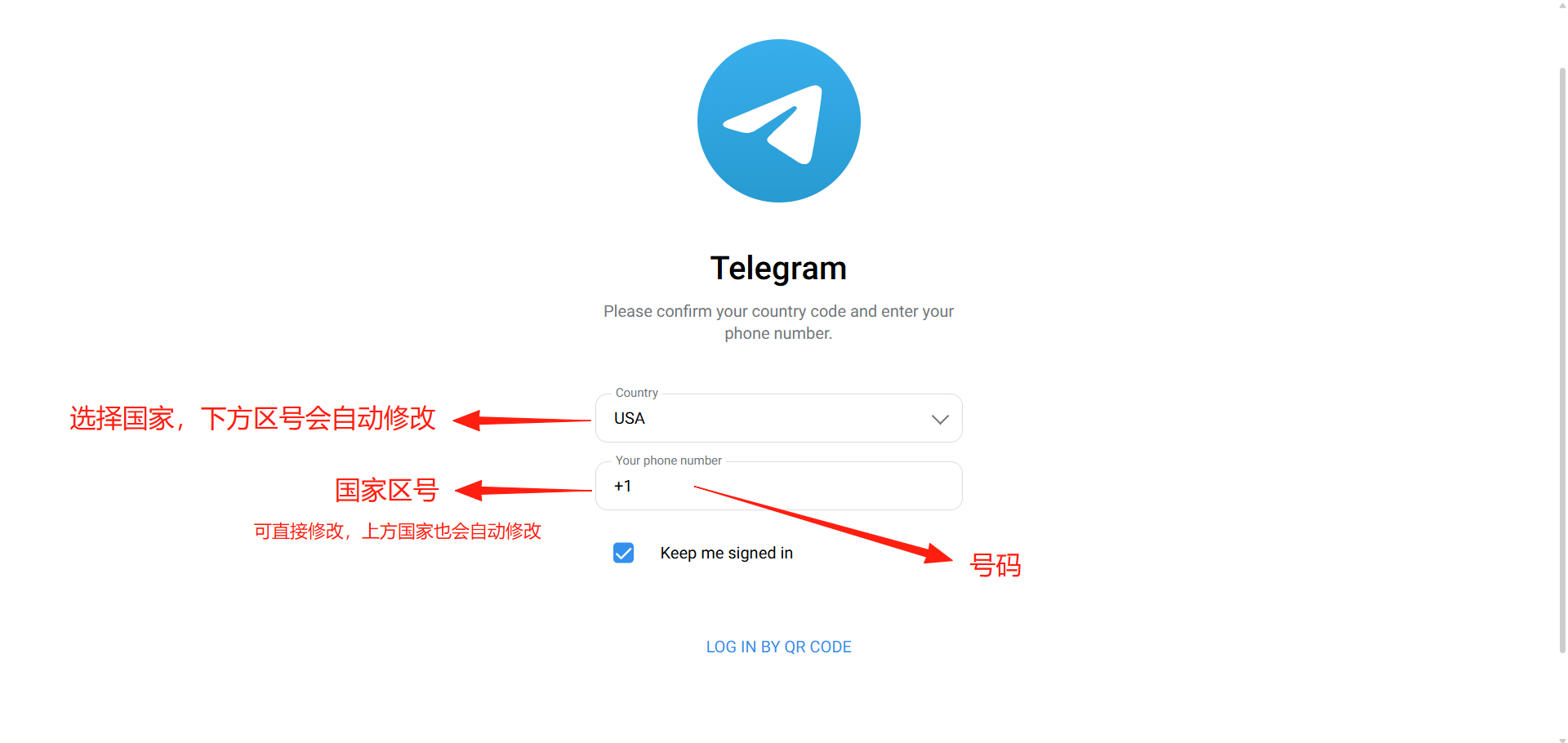
③ Tap "LOG IN BY PHONE NUMBER" and enter the phone number.
Phone number format: +X (country code) ---- 87XXXX07 (number)
④ Tap Next, then enter the SMS code and the 2FA code (two-step verification password) to finish signing in.
Note: the SMS code and 2FA code are provided by us. Codes are one-time: as long as one device stays signed in and online, it receives the code whenever you move the number to or sign in on another device. So we help you sign in only once — see the notes below.
[Telegram web sign-in page]
How it is delivered
🙋 Manual delivery⏰ Working hours UTC+8 09:00–21:00📧 Sent to your order email, also viewable once on the order page
Buy a new account
Nothing needed from you — just wait for delivery after paying.
What AI services does 5buyai.com support? Can I get an invoice?
Accounts, subscriptions and top-ups for ChatGPT, Claude, Midjourney, Gemini, Grok and other major AI tools. Invoices are available for AI orders paid in Chinese yuan (CNY).
How do I receive my order after paying?
Orders are delivered manually: after successful payment, the account or card code is sent to your order email during working hours (9:00–21:00, UTC+8). You can check your order details anytime on the order lookup page by order number, email or browser cache.
What payment methods are supported?
Alipay, WeChat Pay, USDT, and Credit Card payments. Credit card payments require first topping up your balance, and then using the balance to purchase products.
Do I need an account to buy?
No. You can check out as a guest and receive items by email; registering lets you manage orders, balance and invoices in one place.
Are prices shown in CNY?
All prices are listed in Chinese Yuan (¥). When paying with USDT the amount is converted automatically at the live rate.
Is there after-sales support?
After-sales support is available for some products, handled via live chat or the order dispute page. Accounts are virtual products: once delivered, no refunds are given unless there is an after-sales issue. CNY refunds and USD refunds are only made back to the original payment method, and USDT refunds are only made on the BSC network.
I am a business buyer and need to make a bulk purchase. How can I get in touch?
Please click the chat widget at the bottom-right corner to reach us and leave your email or other contact details. We will get back to you as soon as possible.
No reviews yet — be the first to review after your purchase.
Disclaimer
This is an independent third-party platform, not affiliated with, endorsed by, or authorized by any brand mentioned. We do not host any third-party login page and do not collect third-party credentials.