Manus is a general-purpose autonomous AI agent that breaks down a goal and completes multi-step tasks on its own—researc...
About this product
Manus is a general-purpose autonomous AI agent. Describe the result you want and it breaks the job into steps, then works in its own cloud computer — browsing the web, writing code and handling files — and delivers finished work: research reports, websites, data analysis, slides, spreadsheets and more. Watch it live or close the page and come back later. The newer Plan Mode writes out its approach for you to approve before it starts.
Plan benefits
Free account: a small daily credit allowance with the lightweight model.
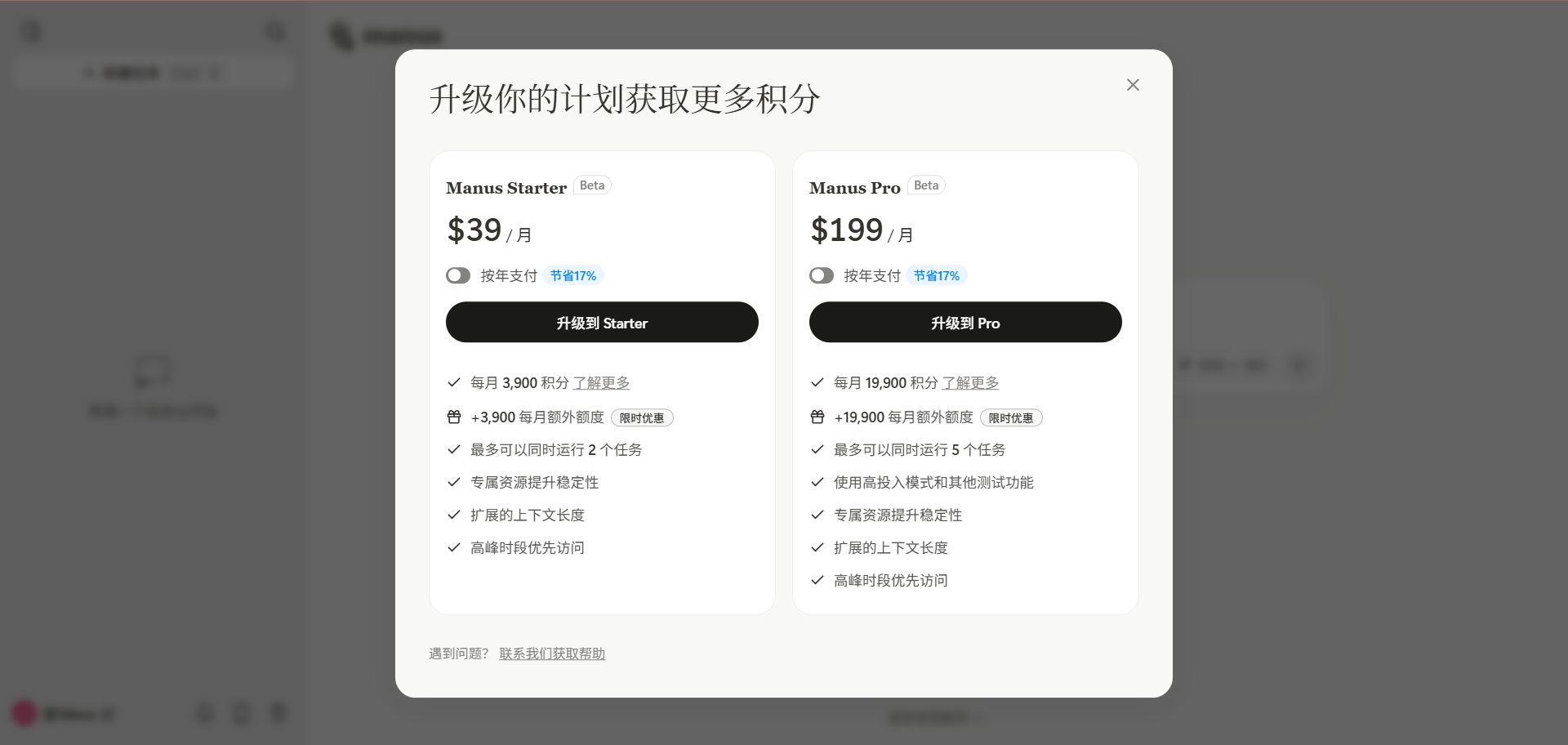
Pro: tiers by monthly credits (4,000 / 8,000 / 40,000), stronger Manus models and more tasks at once.
Team: shared use and central management (minimum 2 seats).
Credits are used per task and complex tasks use more; unused monthly credits don't roll over. See Manus's website for details.
Which plan to choose
To try it: the free "Account" with daily credits.
Occasional reports and slides: Pro 4,000 credits.
Several tasks a week: Pro 8,000 credits.
Heavy or batch use: Pro 40,000 credits; yearly is better value.
Teams: Team plan.
Hand it to Manus
Research · Beginner
Research reports
Gathers sources and writes a cited report.
Sign in at manus.im and start a task
State the question, scope and report format
Download the report when done and check the sources
Try asking
Research the top 10 US pet-supply e-commerce brands in a table: main products, price range and sales channels.
Slides · Beginner
Slides and spreadsheets
Delivers downloadable slides and Excel files.
Describe the slides or spreadsheet and how long it should be
Ask it to create the file
Download, check and ask for changes if needed
Try asking
Turn that research into a 10-slide deck, one brand per slide with a chart.
Websites · Intermediate
Build websites and small apps
Describe it and it codes and deploys a working page.
Describe the site's purpose, pages and style
It writes the code and deploys a live URL
Open the URL to check and request changes
Data · Intermediate
Data analysis and charts
Upload data and it cleans, analyses and charts it.
Upload an Excel or CSV file
Say what you want to find out
Download the charts and findings
Getting started
Describe the task with the goal, scope and output format, e.g. "Research the 2026 Southeast Asian e-commerce market and make a 10-slide deck with charts".
Attach material: files, spreadsheets or images for reference.
Approve the plan: in Plan Mode, review and adjust its steps before it runs.
Watch progress: the right panel shows the pages, code and files it's working on.
Download the results, or keep chatting to have it revise.
Tips
State the output format (slides / Excel / web page / Markdown) up front to save credits.
Start with small tasks to learn how many credits things take.
Check the sources for any facts and figures.
[Manus homepage]
[Manus subscription page]
Check before buying
Credits are used per task, complex tasks use more, and unused credits don't roll over.
Manus official tools
A general AI agent: hand it a job and it researches, writes, builds slides and websites and analyses data on its own cloud computer, then hands back the result. Also has a desktop app that can work on your own computer, a browser extension, mobile apps and email tasks. Billed in credits.
Forward an email to Manus to start a task and get the result by email.
See official siteWeb
Compiled by 5buyai from official websites, directories and GitHub repositories — not an official page; plan details follow the official terms · Plans checked 2026-10-22
🙋 Manual delivery⏰ Working hours UTC+8 09:00–21:00📧 Sent to your order email, also viewable once on the order page
Buy a new account
Nothing needed from you — just wait for delivery after paying.
For: Account, Pro monthly (4,000 credits/mo), Pro monthly (40,000 credits/mo), Pro annual (4,000 credits/mo), Pro annual (40,000 credits/mo), Monthly Team membership (≥2 seats), Pro monthly (8,000 credits/mo)
Recharge my account
After paying, provide on the order page: Account, Password, Notes (optional)
For: Pro monthly (4,000 credits/mo), Pro monthly (40,000 credits/mo), Pro annual (4,000 credits/mo), Pro annual (40,000 credits/mo), Monthly Team membership (≥2 seats), Pro monthly (8,000 credits/mo)
What AI services does 5buyai.com support? Can I get an invoice?
Accounts, subscriptions and top-ups for ChatGPT, Claude, Midjourney, Gemini, Grok and other major AI tools. Invoices are available for AI orders paid in Chinese yuan (CNY).
How do I receive my order after paying?
Orders are delivered manually: after successful payment, the account or card code is sent to your order email during working hours (9:00–21:00, UTC+8). You can check your order details anytime on the order lookup page by order number, email or browser cache.
What payment methods are supported?
Alipay, WeChat Pay, USDT, and Credit Card payments. Credit card payments require first topping up your balance, and then using the balance to purchase products.
Do I need an account to buy?
No. You can check out as a guest and receive items by email; registering lets you manage orders, balance and invoices in one place.
Are prices shown in CNY?
All prices are listed in Chinese Yuan (¥). When paying with USDT the amount is converted automatically at the live rate.
Is there after-sales support?
After-sales support is available for some products, handled via live chat or the order dispute page. Accounts are virtual products: once delivered, no refunds are given unless there is an after-sales issue. CNY refunds and USD refunds are only made back to the original payment method, and USDT refunds are only made on the BSC network.
I am a business buyer and need to make a bulk purchase. How can I get in touch?
Please click the chat widget at the bottom-right corner to reach us and leave your email or other contact details. We will get back to you as soon as possible.
No reviews yet — be the first to review after your purchase.
Disclaimer
This is an independent third-party platform, not affiliated with, endorsed by, or authorized by any brand mentioned. We do not host any third-party login page and do not collect third-party credentials.
The Temperate House at Kew Gardens in London where someone got married:
709 pieces, 10 steps, from the lawn base to the flower arch and the glass roof.
a ramen counter in Gion, Kyoto. eight seats, one rainy night.
759 pieces, 10 steps. every step links to its page in the manual, and story pins mark the details that matter: the corner seats, the red lanterns, the umbrella he lent them.



 Manus official tools