5buyai × AIFUNS
Promoted
Official membership info
Official plan
Official price
Highlights
Our options
Creator
$29/mo
600 credits/mo, 1080p, no watermark, videos up to 30 min
Creator
$288/yr
Creator, billed yearly
Pro
$49/mo
1,000 credits/mo, 4K export, Avatar 6 Pro, pro voice clone
Pro
$488/yr
Pro, billed yearly
Business
$149/mo
1 seat, 1,500 credits/mo, team workspace, SSO; extra seat $20/mo
Business
$1,428/yr
Business, billed yearly

Official prices are list prices in USD published by each brand (before tax), for reference only; checked on 2026-11-16. We are not affiliated with these brands.

HeyGen account / subscription
AI avatar videos from a script, with your own digital twin and translation into 175+ languages

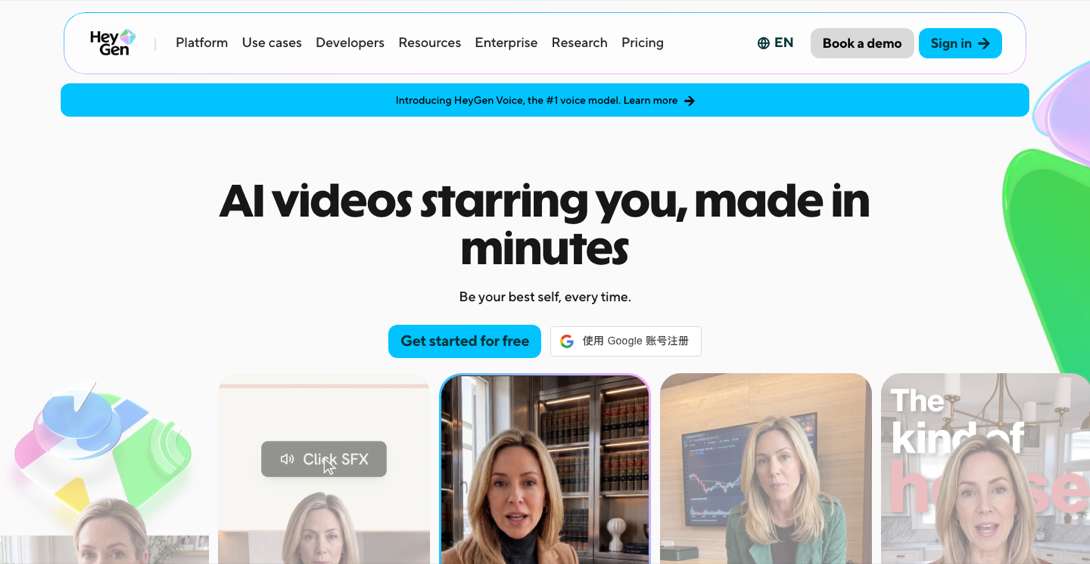
[HeyGen homepage]

About this product

HeyGen is an AI video generator that uses AI avatars instead of filming: type a script and it produces a talking video with natural lip sync, expressions and voice. Use one of 700+ stock avatars, or upload a short clip of yourself to create a digital twin with your own face and voice. It also translates and dubs videos into 175+ languages and dialects, and is widely used for product explainers, training courses, marketing clips and multilingual content.

Which option to choose

  • Account: Free plan, 3 videos per month up to 1 minute each, with HeyGen watermark, 1 custom avatar.
  • Creator monthly / yearly: 600 credits per month, 1080p export without watermark, videos up to 30 minutes, Avatar 6 Turbo, Video Agent, up to 10 hours of HeyGen Voice text-to-speech, and a digital twin with your own face and voice.
  • Pro monthly / yearly: 1,000 credits per month, everything in Creator plus 4K export, Avatar 6 Pro, cinematic avatars, 1 professional voice clone and video models such as VEO 3.1, with faster processing and the highest usage limits.
  • Business monthly / yearly: 1,500 credits per month, everything in Pro plus videos up to 60 minutes, shared team workspace, SSO, 5 custom Avatar 6 Pro avatars and optional credit packs.

Credits are shared across all features; usage depends on the model, video length and complexity. Unused monthly credits roll over for one month; yearly credits accumulate until renewal. Credits and features follow HeyGen's current policy.

How to sign in

① Open the HeyGen website and click Sign in at the top right.

② Choose Continue with email, enter the account email, then enter the password or the email code as prompted (HeyGen also supports Google, Apple and enterprise SSO).

How to use

  1. Pick an avatar: choose a stock avatar under Avatars, or use Create Avatar to upload your own clip.
  2. Write the script: paste your text, choose language and voice, and fine-tune pace and pauses.
  3. Lay out: add backgrounds, captions, images and transitions in AI Studio.
  4. Generate: click Submit, then download the MP4 or share the link.
  5. Translate: upload an existing video in Video Translate and pick a target language for translated, lip-synced output.

Tips

  • Test with a short video on the Free plan before subscribing.
  • For a digital twin, record with even lighting, facing the camera, against a simple background.
🔐 Common ways to sign in (Google / Apple / email / phone) — tap to expand

Platforms sign in differently. Use the method that matches the details in your delivery.

Email and password

  • Open the official site or app, tap Log in, and paste the account and password from your delivery. Make sure no spaces are copied at either end.
  • If you are asked for a one-time code, get it with the matching method below.

Email code or sign-in link

  • Some sites skip the password: after you enter the email, they send a code or sign-in link to it.
  • If your delivery includes the mailbox address and password, open that mailbox to get it. Check spam first and wait 1–2 minutes before resending.

Continue with Google

  • If you received a Google account (Gmail), tap "Continue with Google" on the site you want to use and sign in to that Gmail in the Google window.
  • We recommend signing in to this Google account on a phone first: an Android phone with Google services (Google Play services), or an iPhone with Google apps such as Gmail or the Google app installed. Then use it on a computer or other sites.
  • Google may ask you to confirm the recovery email, enter an authenticator code, or verify a phone number. The recovery email and 2FA key are in your delivery; contact support if a phone code does not arrive.
  • Do not sign in to many Google accounts in one browser, and do not use an emulator.
  • If you received a Google account: don't change its existing password or security info for the first 7 days (you can add a passkey); after that, switch the recovery email, phone and 2FA to your own soon, so the account isn't misused or locked by Google's risk controls.

Apple ID (incl. Sign in with Apple)

  • Enter the Apple ID and password from your delivery in the App Store, or in "Sign in with Apple" on a website.
  • On iPhone, sign in only from your profile icon in the App Store. Do not sign in to iCloud at the top of Settings, or the device may get locked to this account.
  • If a two-factor code does not arrive, contact support instead of resending again and again.

Phone verification

  • If your delivery includes a number and a code link, enter that number and read the code from the link.
  • Otherwise you can use your own phone number. Pick the right country code; contact support if no code arrives.

Authenticator code (2FA / MFA)

  • The 2FA / MFA key in your delivery is a string of letters and digits. Open 5buyai.com/authenticator, paste it into "Secret (Base32)", and you will see the 6-digit code.
  • The code changes every 30 seconds; use the new one if it expires.

Before you sign in

  • Use a stable connection. After the first sign-in, avoid switching between countries or regions often.
  • Sign in on your own computer or phone, not an emulator or a shared device.
  • If you keep seeing "wrong code" or "too many attempts", stop and try again later, or contact support. Repeated retries can trigger security checks.
  • Save your delivery before changing the password, email or phone. If something goes wrong, send support a screenshot.

How it is delivered

🙋 Manual delivery ⏰ Working hours UTC+8 09:00–21:00 📧 Sent to your order email, also viewable once on the order page
Buy a new account
Nothing needed from you — just wait for delivery after paying.
For: Account, Creator monthly (600 credits/mo), Creator yearly (600 credits/mo), Pro monthly (1,000 credits/mo), Pro yearly (1,000 credits/mo), Business monthly (1 seat, 1,500 credits/mo), Business yearly (1 seat, 1,500 credits/mo)
Top up my account
After paying, provide on the order page: Account to top up, Password, Notes (optional)
For: Creator monthly (600 credits/mo), Creator yearly (600 credits/mo), Pro monthly (1,000 credits/mo), Pro yearly (1,000 credits/mo), Business monthly (1 seat, 1,500 credits/mo), Business yearly (1 seat, 1,500 credits/mo)
Refund rules (all products)
  • We couldn't deliver (out of stock, not activated, wrong item): full refund. Failed KYC or other verification services are not included.
  • Didn't work at delivery: report it within 24 hours via After-sales on the order page. Replacement or refund follows the product's pre-order notice; some products (such as Claude accounts) have no after-sales support.
  • Memberships carry no warranty: bans or lost memberships are not refunded or replaced. We refund only when the official service refunds us itself (with a refund email) and we confirm receipt, for the amount actually returned.
Full refunds & after-sales policy →
What AI services does 5buyai.com support? Can I get an invoice?

We offer accounts, subscriptions and top-ups for major AI tools such as ChatGPT, Claude, Gemini, Grok, Midjourney and Cursor, plus related services including Apple IDs, international credit cards, international SMS verification, and WhatsApp and Telegram accounts. AI orders paid in RMB can be invoiced.

How do I receive my order after paying?

Most products are delivered manually: after payment, the account or card key is sent to your order email during working hours (9:00–21:00, UTC+8). Products marked "Instant delivery" on their page are sent automatically right after payment. You can check order details at any time on the Order Lookup page with your order number, email or browser cache.

What payment methods are supported?

Alipay, WeChat Pay, USDT, and Credit Card payments. Credit card payments require first topping up your balance, and then using the balance to purchase products.

Do I need an account to buy?

No. You can check out as a guest and receive items by email; registering lets you manage orders, balance and invoices in one place.

Are prices shown in CNY?

All prices are listed in Chinese Yuan (¥). When paying with USDT, the payment page shows the amount due at the current rate.

Is there after-sales support?

Some products include after-sales support, handled through live chat or the order report page. Accounts are virtual goods, so once delivered, refunds are not available unless there is a problem with the product itself; see the delivery and after-sales section on each product page for its exact coverage. To request a refund, submit it on the order page.

I am a business buyer and need to make a bulk purchase. How can I get in touch?

Please click the chat widget at the bottom-right corner to reach us and leave your email or other contact details. We will get back to you as soon as possible.

What does "non-standard / no warranty" mean?

Some older plan names still say "unofficial, no warranty" or "no warranty". All memberships on this site now carry no warranty: if the account is banned or the membership is lost after activation, we do not refund, re-activate or replace it. We refund only when the official service refunds us itself, sends a refund email, and we confirm receipt; the refund equals the amount actually returned. "Unofficial" plans cost less but the channel is less stable.
No reviews yet — be the first to review after your purchase.
Disclaimer
This is an independent third-party platform, not affiliated with, endorsed by, or authorized by any brand mentioned. We do not host any third-party login page and do not collect third-party credentials.
Related videos
View more
Related guides
✓ Since 2024 ✓ 800+ buyers served ✓ 1,000+ paid orders
Need a hand?
Purchase / payment / account help — chat with us →