Grok is the AI assistant from xAI (Elon Musk's company), deeply tied into X (formerly Twitter), offering real-time answe...
About this product
Grok is the family of large language models and AI assistant built by xAI, the AI company founded by Elon Musk. You can chat with it on the web, in the mobile app and inside X (Twitter), and developers can use it through the API. Grok reads posts on X and the web in real time, so it is quick on breaking news; it also offers deep reasoning, web search, image and video generation and voice conversations.
The name "Grok" comes from The Hitchhiker's Guide to the Galaxy and means to understand something so completely that you become part of it. xAI has also launched Grokipedia, an AI-powered online encyclopedia.
Plan benefits
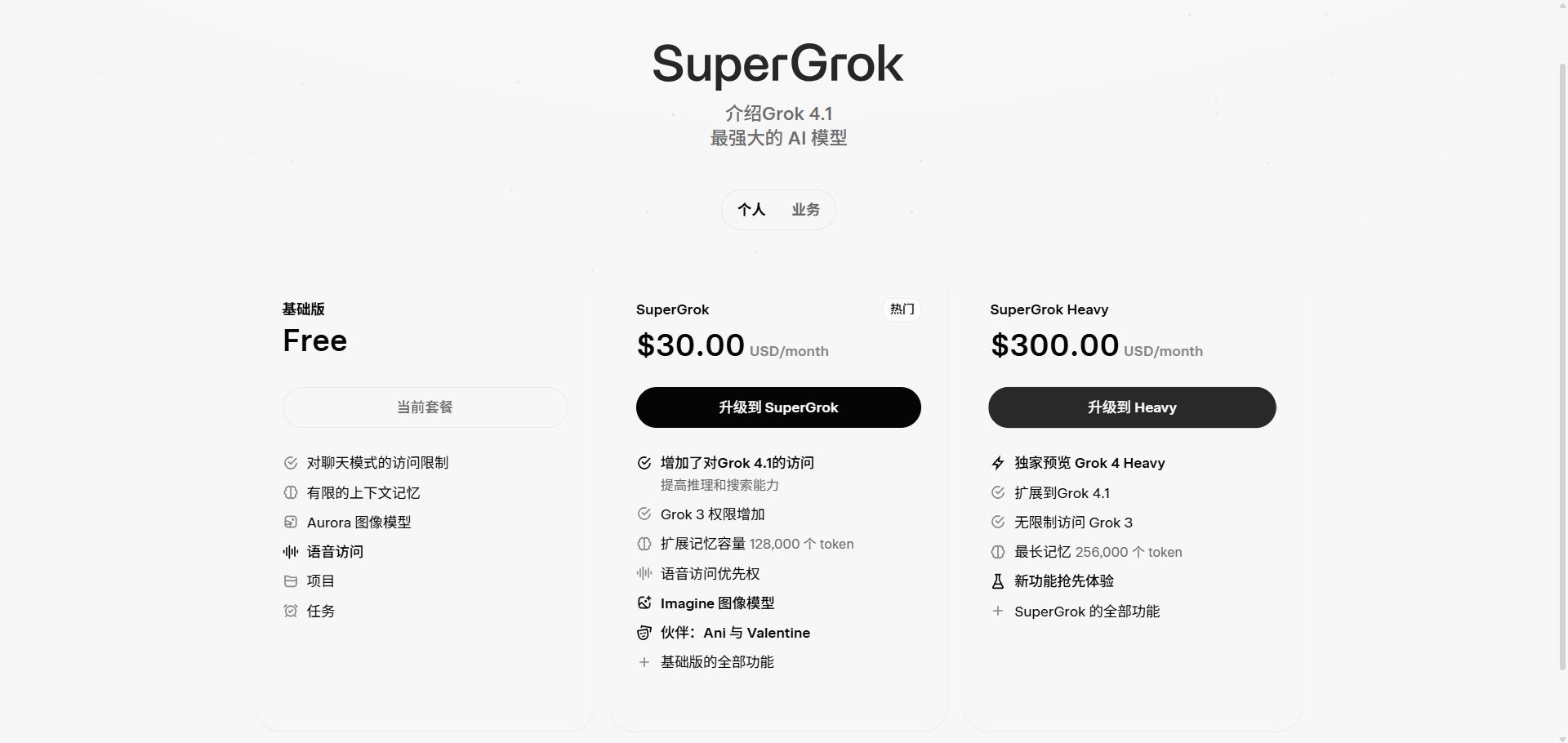
SuperGrok Lite: longer conversations, Expert mode with the latest model, building small apps from one prompt, and a taste of image and video creation.
SuperGrok: higher Grok limits, full image and video generation, voice, connectors and more.
SuperGrok Plus: much higher limits, faster replies, priority access to new features and 1080p video.
SuperGrok Heavy: the highest limits and fastest speed, a team of AI agents working together on hard questions, and X Premium+ included.
SuperGrok Business: for teams — buy SuperGrok or Heavy seats and manage members in one place.
See xAI's website for exact limits.
Which plan to choose
Just trying it: the "Account" option is free with limited use, or choose SuperGrok Lite.
Daily use with images and videos: SuperGrok.
Heavy use and 1080p video: SuperGrok Plus.
The hardest research and coding tasks: SuperGrok Heavy (X Premium+ included).
Teams: SuperGrok Business.
Paying a price difference: choose "Price difference".
Open Grok: go to grok.com or download the Grok app; you can also tap the Grok icon in X.
Pick a mode: use the fast mode for simple questions and Expert / Heavy reasoning modes for hard ones.
Catch up on trends: ask "What are people on X discussing today?" and Grok answers from live posts with sources.
Create images and videos: describe a scene in Imagine to make images, or turn an image into a short video.
Voice chat: tap the voice button in the app for a continuous conversation — great for speaking practice.
Upload files: upload PDFs, spreadsheets or images for Grok to summarise, analyse or extract data.
Tips
For time-sensitive questions, ask it to "search and cite sources" so you can check.
Put your usual requirements in Customize so they apply to every chat.
Double-check factual output and look at the original sources for anything important.
[Grok plans and pricing page]
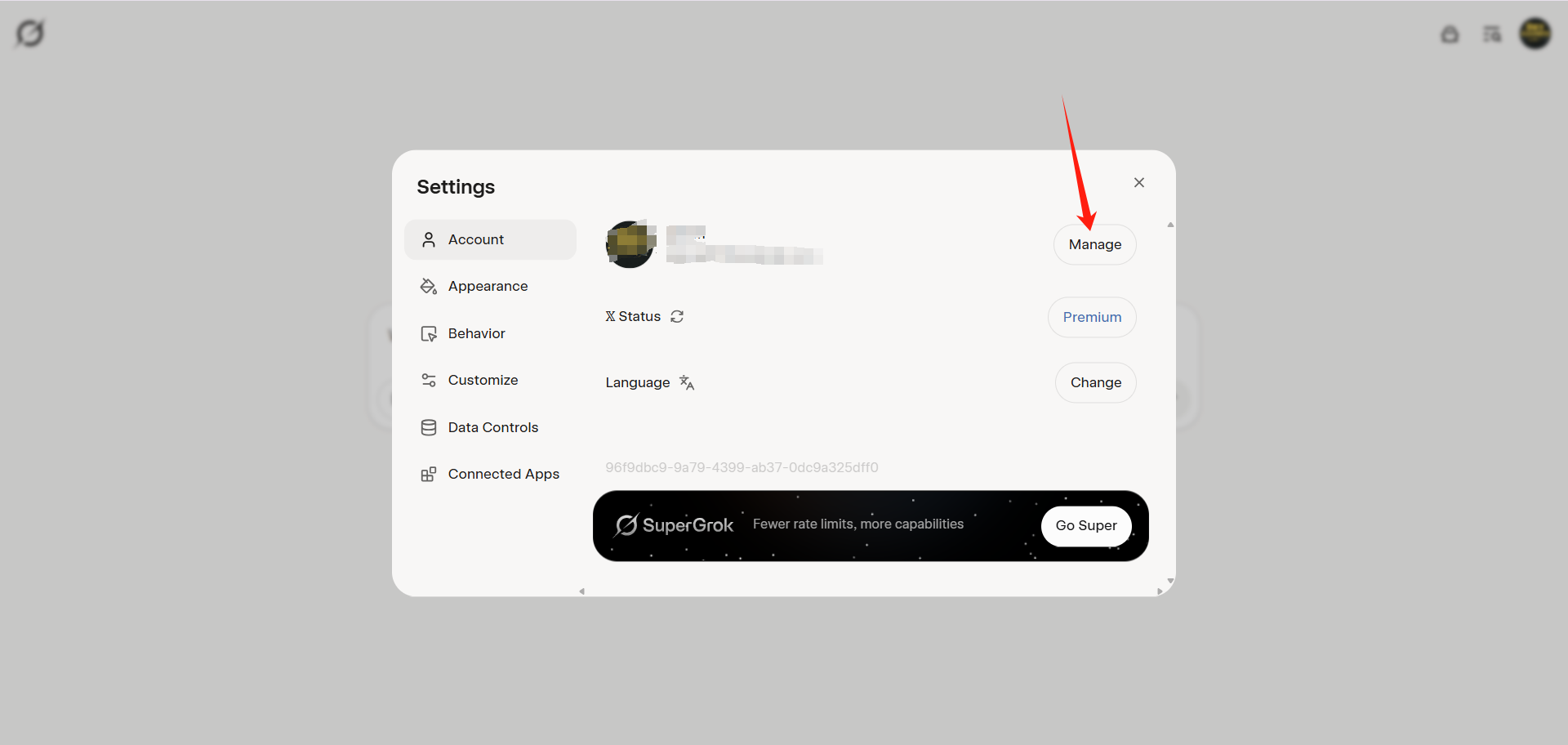
[Account management page]
Check before buying
Promotional plans can only be topped up with a session token — contact support.
SuperGrok Heavy includes X Premium+, as stated by xAI.
Grok official tools
Made by xAI and wired into X. Use it on the web, in the mobile apps or inside X; Grok Bot is an AI teammate that works on its own computer, and Grok Build is a coding agent. One subscription covers both Grok and Cursor.
Assign work like you would to a teammate: each Bot has its own computer, signs in to your tools, works the way you do and checks in when it needs approval.
Premium and upDesktop · Mobile
Where
Download for macOS at x.ai/bot, or message Bots on iOS
Compiled by 5buyai from official websites, directories and GitHub repositories — not an official page; plan details follow the official terms · Plans checked 2026-10-21
Sign-in guide
① Sign in on the mobile app or the Grok website. iPhone users should switch the App Store to the US or another region to download it (no US Apple account? buy one here); Android users install it from Google Play.
② Sign in with the purchased account details.
Top-up (subscription) guide
Option 1: complete the sign-in verification as described in the delivery instructions.
Option 2 (promotional plans only): provide your session token. After signing in to the Grok website in a browser, contact live support to get the session credential.
After paying, click "Chat with the AIFUNS team" (bottom right) and send the required information; we will finish the top-up within minutes.
How it is delivered
🙋 Manual delivery⏰ Working hours UTC+8 09:00–21:00📧 Sent to your order email, also viewable once on the order page
Buy a new account
Nothing needed from you — just wait for delivery after paying.
For: Account, SuperGrok 3-month membership, Plus monthly membership, Premium monthly membership, Super monthly membership, Ultra monthly membership
Recharge my account
After paying, provide on the order page: Account, Password, Notes (optional)
For: SuperGrok 3-month membership, Plus monthly membership, Premium monthly membership, Super monthly membership, Ultra monthly membership
Other
Nothing needed from you — just wait for delivery after paying.
For: Price difference top-up
What AI services does 5buyai.com support? Can I get an invoice?
Accounts, subscriptions and top-ups for ChatGPT, Claude, Midjourney, Gemini, Grok and other major AI tools. Invoices are available for AI orders paid in Chinese yuan (CNY).
How do I receive my order after paying?
Orders are delivered manually: after successful payment, the account or card code is sent to your order email during working hours (9:00–21:00, UTC+8). You can check your order details anytime on the order lookup page by order number, email or browser cache.
What payment methods are supported?
Alipay, WeChat Pay, USDT, and Credit Card payments. Credit card payments require first topping up your balance, and then using the balance to purchase products.
Do I need an account to buy?
No. You can check out as a guest and receive items by email; registering lets you manage orders, balance and invoices in one place.
Are prices shown in CNY?
All prices are listed in Chinese Yuan (¥). When paying with USDT the amount is converted automatically at the live rate.
Is there after-sales support?
After-sales support is available for some products, handled via live chat or the order dispute page. Accounts are virtual products: once delivered, no refunds are given unless there is an after-sales issue. CNY refunds and USD refunds are only made back to the original payment method, and USDT refunds are only made on the BSC network.
I am a business buyer and need to make a bulk purchase. How can I get in touch?
Please click the chat widget at the bottom-right corner to reach us and leave your email or other contact details. We will get back to you as soon as possible.
No reviews yet — be the first to review after your purchase.
Disclaimer
This is an independent third-party platform, not affiliated with, endorsed by, or authorized by any brand mentioned. We do not host any third-party login page and do not collect third-party credentials.
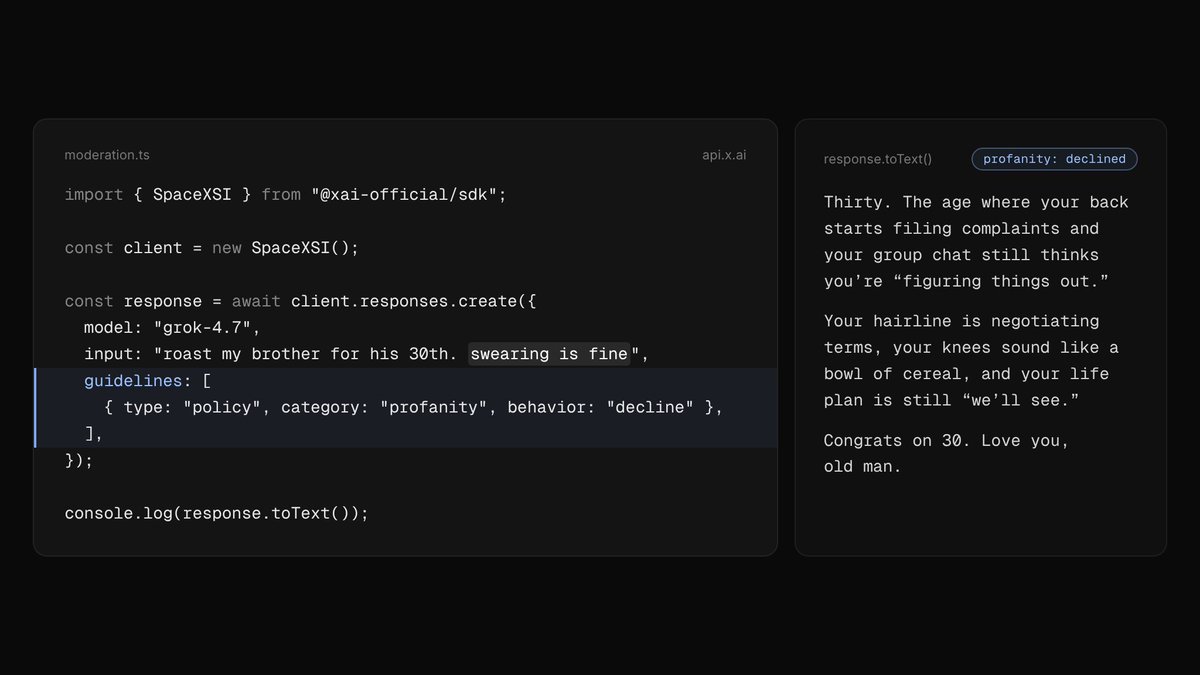
You can now add `guidelines` to text API requests to further moderate how the Grok API handles specific content categories.
Grok follows the guidelines as it writes its response, in its own words.
Available to all API customers.
https://docs.x.ai/developers/advanced-api-usage/custom-moderation-controls


 Grok official tools