5buyai × AIFUNS
Promoted
Official membership info
Official plan
Official price
Highlights
Our options
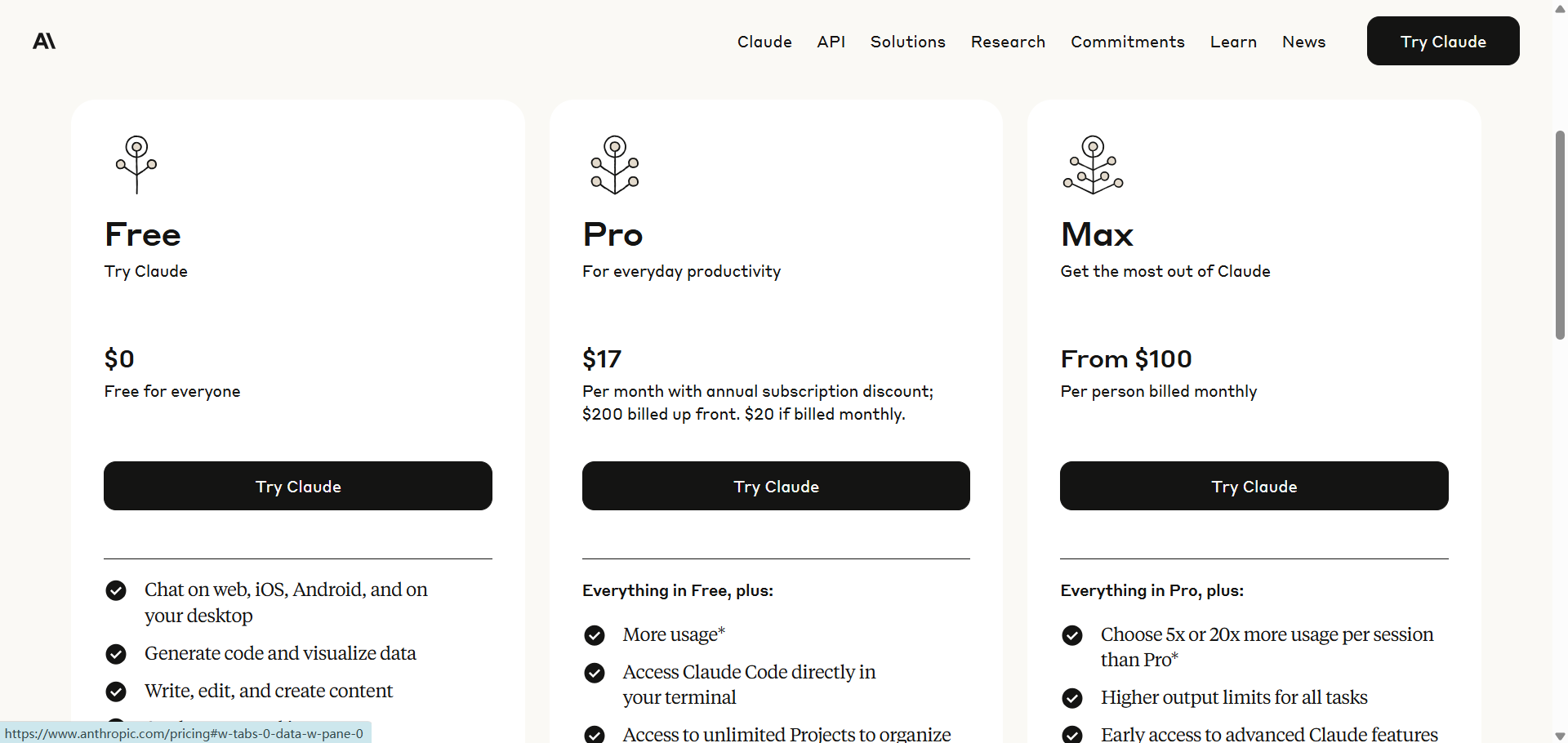
Pro
$20/mo $17/mo billed yearly
More usage, includes Claude Code
Pro (annual)
$200/yr
Pro billed yearly (~$17/mo)
Max 5x
$100/mo
5x Pro usage
Max 20x
$200/mo
20x Pro usage
Team Standard
$25/mo per seat; $20/seat billed yearly
Team standard seat, 2–150 seats
Team Premium
$125/mo per seat; $100/seat billed yearly
5x the usage of a standard seat

Official prices are list prices in USD published by each brand (before tax), for reference only; checked on 2026-10-03. We are not affiliated with these brands.

Claude account / subscription
Claude is Anthropic's AI assistant known for strong long-context understanding, writing, coding, analysis and reasoning.

About this product

Claude is the AI assistant built by Anthropic, a US AI company. It is especially strong at writing, understanding long documents, coding and careful reasoning, with thorough and dependable answers. One account works in all of these places:

  • Web: claude.ai
  • Desktop app (macOS, Windows): includes Cowork (Claude organises files, processes spreadsheets and writes reports on your computer) and desktop extensions
  • Mobile app (iOS, Android): with voice conversations
  • Claude Code: a coding agent you can use in the terminal, your editor, the desktop app and on the web
  • Claude in Chrome browser extension: clicks, fills in and gathers information on web pages for you
  • Claude for Microsoft 365: use Claude inside Excel, PowerPoint, Word and Outlook
  • API: for developers and businesses building on Claude, billed separately from plans

Included even on the free plan (per the official site): chat, web search, file creation, code execution, memory, app connections, Artifacts, plus Claude Design, Slides and Docs.

Which plan to choose

  • Pro: the right choice for most people, with more usage plus Claude Code, Projects, scheduled tasks, and the Chrome and Microsoft 365 extensions.
  • Max 5× / 20×: 5× and 20× Pro's usage, with longer outputs, priority at peak times and early access to new features — for heavy Claude Code users and long tasks.
  • Team: for teams, with Standard and Premium seats, an admin console and single sign-on.

Prices and usage limits are shown in "Official membership info" at the top of this page (checked against the official site).

For how Claude memberships, Team / Enterprise and the API differ in price, see "Claude memberships, Team/Enterprise and API: prices and differences".

[Claude pricing] How Claude pricing and Max plan usage limits work

⚠️ Before you buy

① If an account used on your device was banned before, a new account used on the same device faces a very high risk of being banned too. We recommend following How to clear device data to protect a new Claude account.

② OAuth tokens obtained from Claude Free, Pro or Max accounts may only be used with the Claude Code CLI and claude.ai. Using such a token in any other product, tool or service (including third-party agent frameworks and custom tools outside the Agent SDK, such as OpenClaw) clearly violates the Consumer Terms of Service; the account will be banned and you bear any resulting loss.

③ To top up or renew a subscription, please wait until the current membership has expired before buying. We are not responsible for any membership time lost by topping up early.

What Claude can do for you
Watch videos · 8
Writing · Beginner
Writing, editing and translation
Long articles, reports, emails, polishing and translation in a natural tone, following your instructions closely.
Documents · Beginner
Understand long documents and contracts
Upload a whole PDF or contract to get key points, risky clauses or a version comparison.
Office · Intermediate
Create Word, Excel and PowerPoint files
Describe what you need and get downloadable documents, spreadsheets and slides, or work directly in the Excel and PowerPoint add-ins.
Research · Intermediate
Research reports
Searches and reads over several rounds, then writes a report with citations.
Design · Intermediate
Prototypes and designs with Claude Design
Generate web prototypes, posters and decks from a description, then refine them in conversation.
Computer · Advanced
Cowork gets work done on your computer
Give it a folder to organise files, batch-process spreadsheets and write reports; it asks before important actions.
Coding · Advanced
Code with Claude Code
Understands a whole project in your terminal or editor, changes code, runs tests and commits.
About Claude Code →

Getting started

  1. Pick a model: switch models below the message box. Opus is the most capable, for hard problems and long tasks; Sonnet balances speed and ability for everyday work; Haiku is the fastest. Turn on "extended thinking" for complex questions.
  2. Read long documents: upload PDFs, Word, Excel or images — even a whole contract or report — and ask for a summary, risky clauses or a comparison of two versions.
  3. Create files and Artifacts: have Claude produce Word, Excel, PowerPoint or PDF files, or small interactive web pages and charts, preview them on the right and download.
  4. Projects: put reference material and standing instructions in a project; every chat in it will use them (from Pro).
  5. Research: turn it on and Claude searches and reads over several rounds, then returns a report with citations.
  6. Connect apps: connect Google Drive, Gmail, Calendar, GitHub, Notion and more in Settings so Claude can read your material (only what you authorise).
  7. Cowork (desktop): point it at a folder and let it organise files, batch-process spreadsheets and write reports; it explains its plan first and asks before important actions.
  8. Claude Code: write code, change projects and run tests — see the Claude Code page and "Claude Code tutorial".

Tips

  • State the background, goal, constraints and output format; with lots of material, separate it with headings so Claude understands it precisely.
  • One or two examples of the tone or format you want work far better than "make it better".
  • For long tasks, ask for a plan first and let it proceed after you approve.
  • When a chat gets very long, start a new one with a short summary — answers stay more consistent and you use less of your limit.
Check before buying
Claude's risk controls are strict: read "Tips to avoid bans" under "Sign-in & subscription" before buying and follow them.
Usage limits differ by plan — compare them in "Official membership info" above; Cowork and Claude in Chrome need the desktop app or a paid plan.
Claude accounts and memberships from our shop come with no after-sales warranty; see "Delivery & support".

Claude official tools

Made by Anthropic. Beyond chat on the web there are desktop and mobile apps, a Chrome extension, Office add-ins, the Claude Code coding agent, and over a thousand connectors and plugins in the official directory.

12 Apps & products · 17 Everyday features · 1040 Connectors · 529 Plugins · 19 Skills

Apps & products 12

Claude on the webThis product

Use Claude in any browser: chat, write, read files and make sheets, slides and designs. The front door to every feature.

All plans, including FreeWeb

All of Claude in one app: a global shortcut, access to local files, desktop extensions, plus Cowork and Claude Code built in.

All plans, including FreeDesktop

Claude reads the page you are signed in to, then clicks, types and fills forms — sorting Drive, pulling dashboard numbers, cleaning promo emails — while you approve what matters.

Pro and upBrowser extension · Desktop

Build models in Excel without breaking formulas, make slides in your PowerPoint template, edit Word with tracked changes and triage Outlook (beta) — every edit reviewable.

Pro and upOffice add-ins

Hand Claude a bug fix, tests or a multi-day migration, and steer it from the terminal, VS Code, JetBrains, desktop, web, mobile or Slack.

Pro and upTerminal · IDE · Desktop · Web · Mobile · Slack / Teams

Give it a goal and it works through your folders and tools to deliver spreadsheets, decks and reports — on a schedule, even with your laptop closed.

Pro and upDesktop · Web · Mobile

Describe a visual and Claude drafts it on brand — one-pagers, posters, clickable mockups — then refine on canvas and export to PDF, PowerPoint, HTML or Canva and Adobe.

All plans, including FreeWeb · Desktop

Tag @Claude in any Slack thread and it reads the context, does the work — numbers, tickets, action items — and posts back; it can also run standing tasks.

Team / EnterpriseSlack / Teams

A desktop AI workbench for scientific research — literature, data and analysis with Claude.

Pro and upDesktop

Everyday features 17

Answers about current events, with sources, by searching the web.

All plans, including FreeWeb · Desktop · Mobile

Spends minutes searching dozens of sources and returns a cited research report.

Pro and upWeb · Desktop · Mobile

Remembers your preferences and project context across chats; see, edit or delete every item under Settings → Memory.

All plans, including FreeWeb · Desktop · Mobile

Describe it and get an interactive page, game, calculator or dashboard you can preview, edit and share by link.

All plans, including FreeWeb · Desktop · Mobile

Ask for a deck or document in any conversation and edit it as you go; Docs are living documents you can write with your team.

All plans, including FreeWeb · Desktop

Package how you work — brand rules, report formats, analysis steps — into skills Claude applies automatically, the same across Claude.ai, Claude Code and the API.

All plans, including FreeWeb · Desktop · Terminal

Let Claude work with Gmail, Google Drive, Notion, Slack and more; web connectors work on web, desktop and mobile — the full official directory is listed below.

All plans, including FreeWeb · Desktop · Mobile

Paste the official prompt into your old AI, then paste its answer into Claude’s memory settings — your context moves over in a minute.

See official siteWeb · Desktop

Keep files, instructions and chats for one topic together so every question in the project uses that context.

All plans, including FreeWeb · Desktop · Mobile

Upload Excel, CSV or PDF files and Claude runs code to analyze them, chart them and hand back downloadable Excel, Word or PowerPoint files.

All plans, including FreeWeb · Desktop · Mobile

Set recurring work to run daily, weekly or monthly with no device online — results wait for your review.

Pro and upWeb · Desktop · Mobile

In Cowork and Claude Code, Claude can open files, run tools and point and click on your screen to finish tasks — no setup required.

Pro and upDesktop

Talk with Claude out loud — handy on the go or for language practice.

All plans, including FreeMobile · Web · Desktop

Locally installed extensions that give Claude access to your files, browsers and native apps.

All plans, including FreeDesktop

Temporary chats that stay out of history and memory.

All plans, including FreeWeb · Desktop · Mobile

A monthly recap of topics and your most active times, plus optional break reminders and quiet hours.

All plans, including FreeWeb · Desktop

Connectors 1040

See all 1040 connectors →

Plugins 529

Frontend Design✓ Craft production-grade frontends with distinctive design. Generates polished code that avoids generic AI aesthetics. Superpowers Claude learns brainstorming, subagent development with code review, debugging, TDD, and skill authoring through Superpowers. Code Review✓ AI code review with specialized agents and confidence-based filtering for pull requests Context7 Upstash Context7 MCP server for live docs lookup. Pull version-specific docs and code examples from source repos into LLM context. Code Simplifier✓ Code clarity agent: simplifies and refines recently modified code while preserving functionality and consistency. Playwright Browser automation and end-to-end testing MCP server by Microsoft. Enables Claude to interact with web pages, take screenshots, fill forms, and automate testing workflows. GitHub Official GitHub MCP server for repo management. Create issues, manage PRs, review code, search repos, and access GitHub's API from Claude Code. CLAUDE.md Management✓ Tools to maintain CLAUDE.md - audit quality, capture learnings, and keep project memory current. Feature Dev✓ Feature development workflow with agents for exploration, design, and review Security Guidance✓ Security hook warns about command injection, XSS, and unsafe code patterns when editing files Vercel Vercel integration for Claude Code. Manage deployments, builds, logs, domains, and frontend infrastructure directly. TypeScript LSP✓ TypeScript/JavaScript language server for enhanced code intelligence
See all 529 plugins →

Skills 19

academy-guide✓ > algorithmic-art✓ Creating algorithmic art using p5.js with seeded randomness and interactive parameter exploration. Use this when users request creating art using code, generative art, algorithmic art, flow fields, or particle systems. Create original algorithmic art rather than copying existing artists' work to avoid copyright violations. brand-guidelines✓ Applies Anthropic's official brand colors and typography to any sort of artifact that may benefit from having Anthropic's look-and-feel. Use it when brand colors or style guidelines, visual formatting, or company design standards apply. canvas-design✓ Create beautiful visual art in .png and .pdf documents using design philosophy. You should use this skill when the user asks to create a poster, piece of art, design, or other static piece. Create original visual designs, never copying existing artists' work to avoid copyright violations. claude-api✓ |- discernment-nudge✓ > doc-coauthoring✓ Guide users through a structured workflow for co-authoring documentation. Use when user wants to write documentation, proposals, technical specs, decision docs, or similar structured content. This workflow helps users efficiently transfer context, refine content through iteration, and verify the doc works for readers. Trigger when user mentions writing docs, creating proposals, drafting specs, or docx✓ Use this skill whenever the user wants to create, read, edit, or manipulate Word documents (.docx files) or Word templates (.dotx files). Triggers include: any mention of 'Word doc', 'word document', '.docx', '.dotx', or requests to produce professional documents with formatting like tables of contents, headings, page numbers, or letterheads. Also use when extracting or reorganizing content from . frontend-design✓ Guidance for distinctive, intentional visual design when building new UI or reshaping an existing one. Helps with aesthetic direction, typography, and making choices that don't read as templated defaults. internal-comms✓ A set of resources to help me write all kinds of internal communications, using the formats that my company likes to use. Claude should use this skill whenever asked to write some sort of internal communications (status reports, leadership updates, 3P updates, company newsletters, FAQs, incident reports, project updates, etc.). mcp-builder✓ Guide for creating high-quality MCP (Model Context Protocol) servers that enable LLMs to interact with external services through well-designed tools. Use when building MCP servers to integrate external APIs or services, whether in Python (FastMCP) or Node/TypeScript (MCP SDK). pdf✓ Use this skill whenever the user wants to do anything with PDF files. This includes reading or extracting text/tables from PDFs, combining or merging multiple PDFs into one, splitting PDFs apart, rotating pages, adding watermarks, creating new PDFs, filling PDF forms, encrypting/decrypting PDFs, extracting images, and OCR on scanned PDFs to make them searchable. If the user mentions a .pdf file or
See all 19 skills →

Latest official updates last 45 days

Compiled by 5buyai from official websites, directories and GitHub repositories — not an official page; plan details follow the official terms · Plans checked 2026-10-21

Sign-in guide

① Open the Claude sign-in page in your browser, the Claude desktop app (Windows or Mac) on your computer, or the Claude app on your phone.

② There are three ways to sign in:

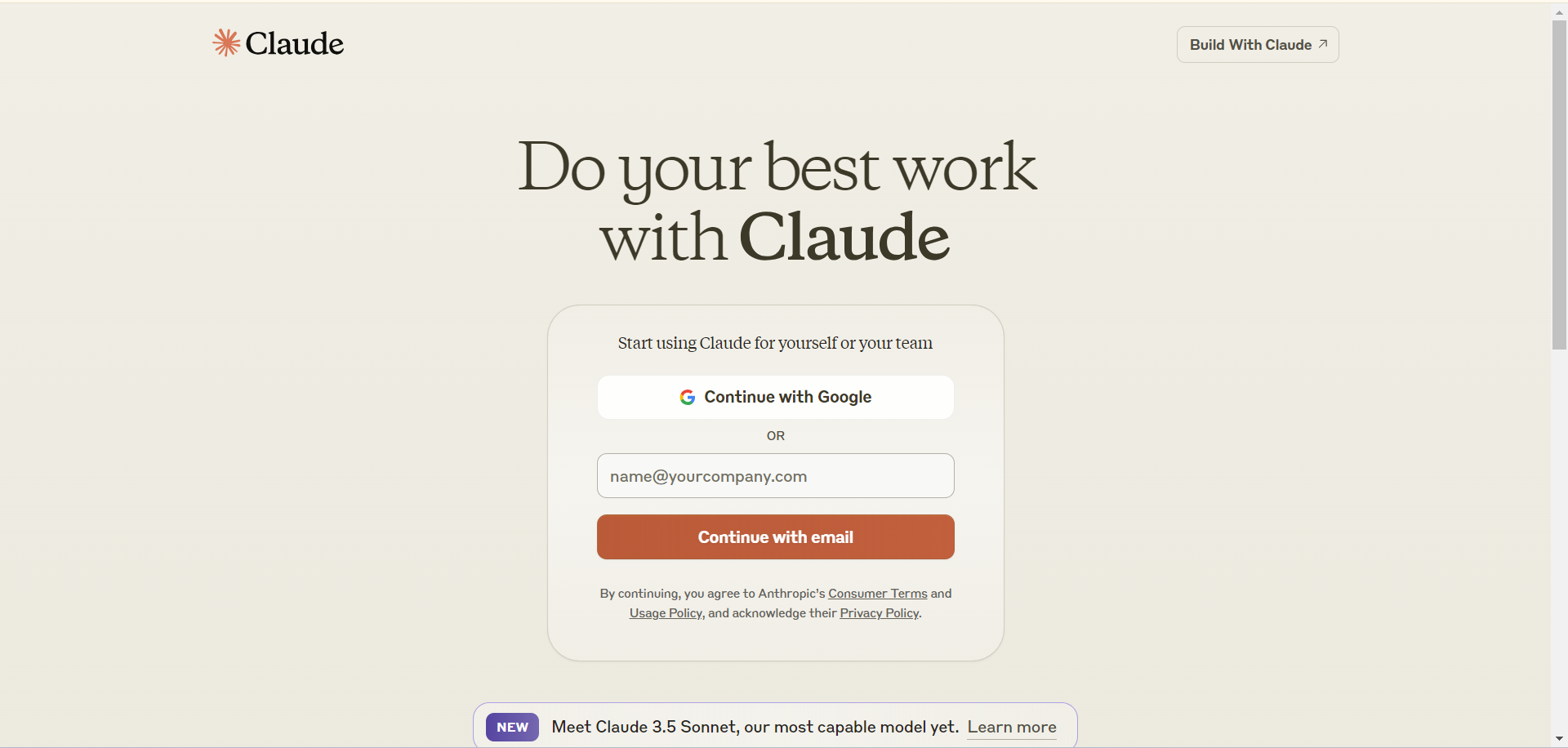
  1. With a Google account: click "Continue with Google" and enter the Google account and password (see the detailed Google sign-in guide).
  2. With email: enter the email address, click "Continue with email", then open the mailbox, find the sign-in email and click the black "Sign in to Claude.ai" button. (Signing in from the usual location takes you straight to your Claude page; from a new location you will be shown a verification code.)
  3. With an Apple account: click "Continue with Apple" and enter the Apple account and password. (On your first sign-in, do not choose two-factor authentication or any upgrade options; you bear the consequences otherwise — see the related guide.)

③ If you use Claude in Chrome on a computer, signing in with the Claude Sessionkey is simple and more stable (see the detailed Sessionkey sign-in guide). If you have several Claude accounts, see Chrome multi-profile overview.

Top-up (subscription) guide

① Provide your account and sign in together with our support team;

② Provide your Sessionkey (extract it from the Claude user page with the Cookies Manager extension);

③ Provide your Organization ID (click your avatar at the bottom left → Settings → Account to find it);

④ Usage credits top-up: we provide virtual card details and you add the card yourself. (Important: your first purchase must include the card opening fee, and the minimum top-up is US$100. After-sales: any remaining balance is refundable. Do not make payments when the balance is insufficient — turn off "Turn on usage credits to keep using Claude if you hit a plan limit" — otherwise the card will be frozen and no refund will be given.)

[Claude KYC or CVP verification]

Verification is available for countries in Asia, Africa and Latin America (assigned at random; you cannot choose the country). Learn more

[Claude sign-in page]
⑦ After the membership is activated, refresh the page or restart the app to see your subscription status.

⑧ Claude Code is included with Pro, Max and Team. Beginners can start with "Claude Code tutorial".

Tips to avoid bans

① Don't switch VPN nodes frequently. Don't sign in to a new account from our shop on several devices in its first week, and don't share one account among several people.

② Sign in no more than 3 times a day and on no more than 3 devices; you can remove devices in Settings.

③ Keep your device's time zone the same as your VPN node's time zone.

④ Don't use free or cheap VPNs (in particular, do not use Hong Kong or Macau nodes), and don't sign in through mirror sites.

⑤ Use your VPN in global mode for Claude (no rule-based or split routing), and stay on one fixed node (no switching or auto-switching).

⑥ Don't open emails from Anthropic, or connect to Claude, from regions where Anthropic does not allow its use.


How it is delivered

🙋 Manual delivery ⏰ Working hours UTC+8 09:00–21:00 📧 Sent to your order email, also viewable once on the order page
Buy a new account
Nothing needed from you — just wait for delivery after paying.
For: Account, CVP verification service (Cyber Verification Program, Defense Access), KYC identity verification service (Identity Verification · Persona)
Recharge my account
After paying, provide on the order page: Account, Sessionkey token, Organization ID
For: Pro monthly membership (no warranty), Max 5x monthly membership (no warranty), Max 20x monthly membership (no warranty), Pro annual membership (no warranty), Team monthly membership, Standard seat (1 seat), Team monthly membership, Premium seat (1 seat)
Verify my account (KYC)
After paying, provide on the order page: Account, Sessionkey token (optional), KYC link (URL)
For: KYC identity verification service (Identity Verification · Persona)
Credit card (new)
Nothing needed from you — just wait for delivery after paying.
For: Card opening fee (first Usage credits top-up)
Top up my credit card
After paying, provide on the order page: Last 4 digits of the card number
For: Usage credits top-up ($100)
Other
Nothing needed from you — just wait for delivery after paying.
For: Price difference top-up, Own account with KYC identity verification passed (account not included), No KYC verification for now (can be added if triggered)

After-sales policy

① Because of Claude's strict risk controls, accounts are very easily banned, so we do not provide after-sales support for accounts. We also provide no after-sales support if the account cannot be used because its email provider restricts sign-in.

② Pro monthly memberships have no warranty against bans or losing the subscription.

③ Max monthly memberships have no warranty against bans or losing the subscription. Max requires KYC verification. If a Max membership is not credited, is lost or the account is banned, we still charge the fee and provide no warranty, after-sales support or refund.

④ Team memberships are available to business customers — contact us to buy.

⑤ Because Claude bans accounts so aggressively, customers whose account is banned on the first day are still charged the handling fee (as set out in ② and ③).

⑥ KYC or CVP verification may lead to a ban or loss of the subscription; our KYC and CVP verification services come with no warranty.

⑦ Usage credits come with no warranty.

What AI services does 5buyai.com support? Can I get an invoice?

Accounts, subscriptions and top-ups for ChatGPT, Claude, Midjourney, Gemini, Grok and other major AI tools. Invoices are available for AI orders paid in Chinese yuan (CNY).

How do I receive my order after paying?

Orders are delivered manually: after successful payment, the account or card code is sent to your order email during working hours (9:00–21:00, UTC+8). You can check your order details anytime on the order lookup page by order number, email or browser cache.

What payment methods are supported?

Alipay, WeChat Pay, USDT, and Credit Card payments. Credit card payments require first topping up your balance, and then using the balance to purchase products.

Do I need an account to buy?

No. You can check out as a guest and receive items by email; registering lets you manage orders, balance and invoices in one place.

Are prices shown in CNY?

All prices are listed in Chinese Yuan (¥). When paying with USDT the amount is converted automatically at the live rate.

Is there after-sales support?

After-sales support is available for some products, handled via live chat or the order dispute page. Accounts are virtual products: once delivered, no refunds are given unless there is an after-sales issue. CNY refunds and USD refunds are only made back to the original payment method, and USDT refunds are only made on the BSC network.

I am a business buyer and need to make a bulk purchase. How can I get in touch?

Please click the chat widget at the bottom-right corner to reach us and leave your email or other contact details. We will get back to you as soon as possible.

No reviews yet — be the first to review after your purchase.
Disclaimer
This is an independent third-party platform, not affiliated with, endorsed by, or authorized by any brand mentioned. We do not host any third-party login page and do not collect third-party credentials.
Related videos 8 videos
View more
View more Go to Feed
More videos
Related guides
View all 26 →
Claude hub: all products and guides→
Latest posts 4
See all posts →
Claude
@claudeai
2MFollowers
126Cached
New features and betas ship the same day they go live on the native Claude Platform. Fast mode for Opus 5.5, code execution, the Skills API, and more are available today. Read more: https://t.co/49fGwxifP8
299 19
View on X →
Claude Models on Google Cloud (Anthropic managed) is now generally available. Get the full set of Claude Platform features on Google Cloud, with Google Cloud IAM credentials, billing, and commitment retirement. https://t.co/JyRT8Y401r
6.2K 344
View on X →
Starting next week, sessions across Claude web, desktop, and mobile apps will run in auto mode by default on Pro, Max, and Team plans. Rather than asking you to approve each step, an automated check blocks risky actions. Switch back to manual anytime. https://t.co/g9yvbMWH6X
20.8K 842
View on X →
✓ Since 2024 ✓ 600+ buyers served ✓ 1,000+ paid orders
Need a hand?
Purchase / payment / account help — chat with us →