
PixVerse can run text-to-video and image-to-video in the same creation flow. This walkthrough follows the official posts How to Create Consistent Characters With AI: PixVerse V6 Guide and How to Make a Promo Video in 2026: set your parameters, generate a clip, or use Promo Mix in Mini Apps for a product promo. This is a beginner how-to, not a plan guide. Verified 23 Nov 2026 (Singapore time). Credit costs always follow the button in your account that day.
Set the parameters, then click Create
Open the official PixVerse site and go to the video creation area. The official V6 guide says one generation can run up to about 15 seconds, at up to 1080p, with common aspect ratios from 16:9 through 9:16. The official UI screenshot also shows ratios such as 21:9, 4:3, 1:1, 3:4, 3:2, and 2:3, plus duration options from 1 to 15 seconds. Choose resolution, aspect ratio, and duration before you write the prompt.
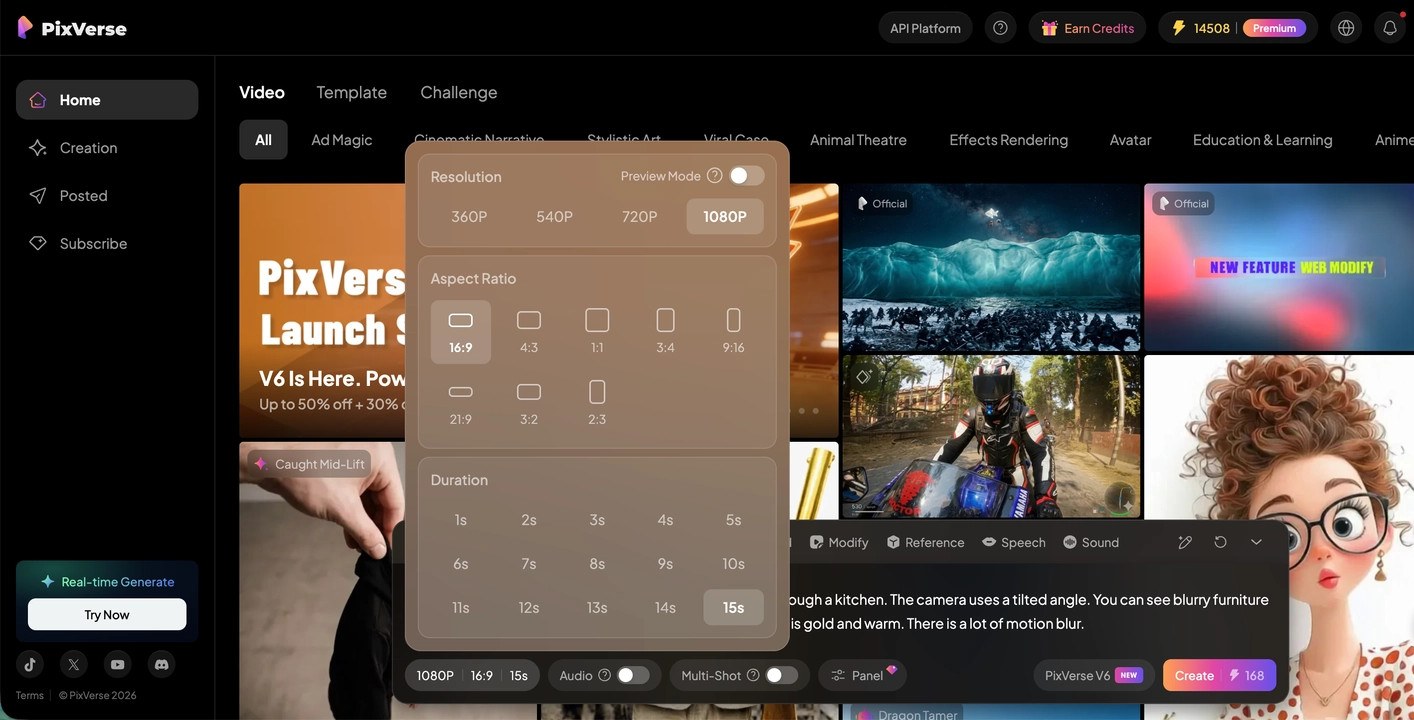
This still is from the official V6 character-consistency guide. In the example, 1080P, 16:9, and 15 seconds are selected, and Preview Mode is on. The bottom bar also shows Audio, Multi-Shot, Panel, and the PixVerse V6 model. The 168 credits next to Create are only the cost shown for that example; check the number on your own Create button.
Keep a character steadier: lock the description, and add a reference if you need it
The same official guide keeps text-to-video and image-to-video in one flow. For a more stable identity, it recommends a fixed identity paragraph plus a clear portrait as the starting frame, which held better in their tests than text alone. When a scene needs more than one beat or camera angle, turn on Multi-Shot and describe those shots in a single job, so wardrobe and setting are less likely to reset the way they can when you stitch separate clips. The official FAQ also says new accounts usually receive daily credits you can spend in the video creator—useful for rehearsing at a shorter duration or lower resolution before you raise the settings.
Look at the credit cost next to Create before you run a job. The official FAQ says to check live pricing and credit costs in the app before you promise a delivery date.
Make a product promo with Promo Mix
If you want a product promo rather than a single generated shot, official docs place Promo Mix in Mini Apps. The 17 April 2026 official tutorial describes it as a run that can handle script, storyboard, voiceover, and background music, and it lists three steps.
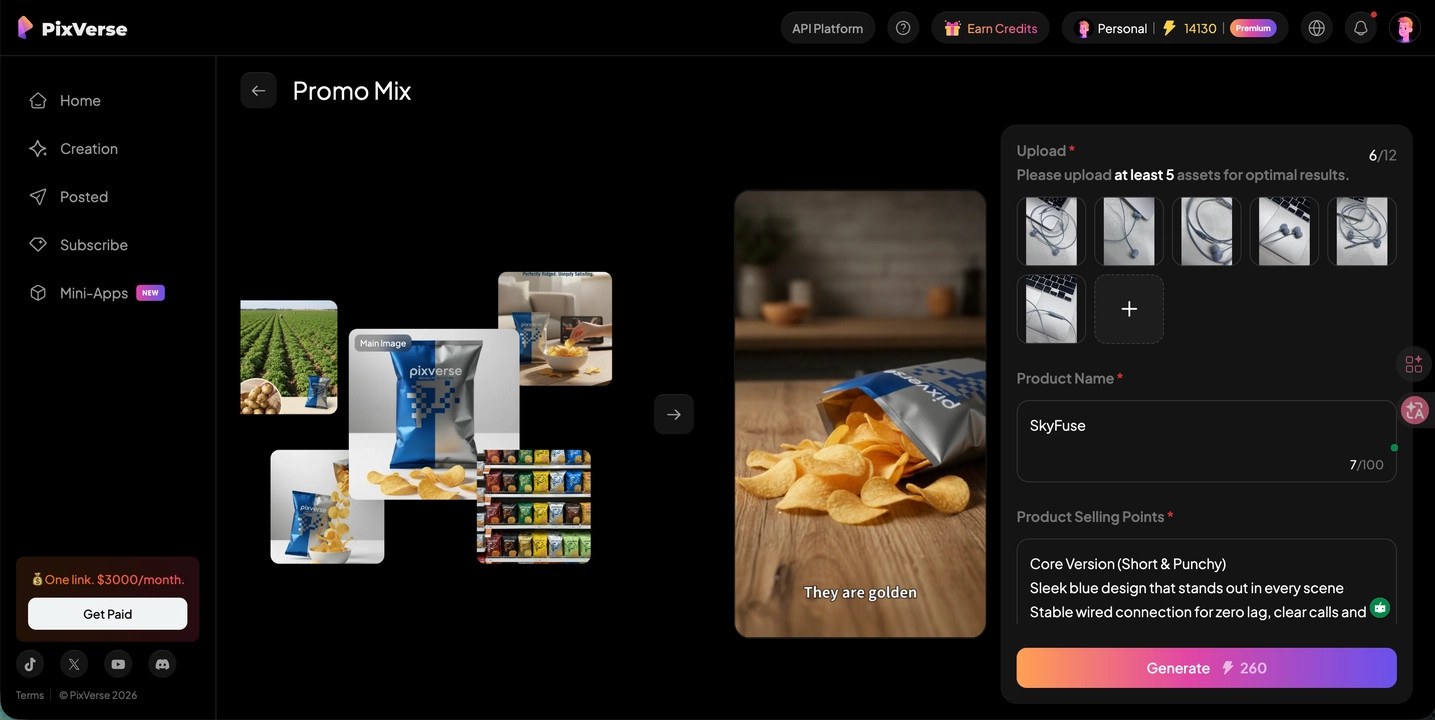
This still is from the official promo tutorial. The left sidebar shows Home, Creation, Posted, Subscribe, and Mini-Apps. The right panel asks you to upload assets and fill in Product Name and Product Selling Points. The example has uploaded 6 of 12 images for a product named SkyFuse, and the UI says Please upload at least 5 assets for optimal results. The 260 credits next to Generate are an example for that job; use the number on your button.
- Prepare assets. The official steps say to upload at least five product photos or videos, including different angles and details. Optional live-action clips should stay under three minutes each. Add selling points as text, including functions, materials, or the target audience. The official FAQ also says four to ten high-quality product photos work well, the system supports up to 12 visual uploads, and you may add up to two live-action clips under three minutes each. The on-screen “at least 5 assets” wording and the FAQ’s 4–10 photo range differ slightly; follow the prompt in the interface when you upload.
- Submit the assets to Promo Mix. Official guidance is to generate a 20-second test first, so you can check the script and creative direction before you spend more credits.
- Review and export. Official docs say you can export at 720p or 1080p, and turn background music, subtitles, a brand logo, and end cards on or off to match ad-network requirements.
The official FAQ also says Promo Mix was about $2 per video based on their data at the time, and tells you to check in-app rates. That figure can change with credit pricing and settings, so do not treat it as a fixed list price.
Facts verified on 23 Nov 2026 from the official PixVerse blog pages that day. Parameter options, credit costs, and the Promo Mix entry point can change; follow the interface in your account.
If you plan to start or renew a PixVerse membership, you can review the product page on this site.