Updated 2026-11-11: Cursor is now sold as part of The X Subscription, so new customers see four tiers: Plus, Premium, Super and Ultra. Pro, Pro+ and the old Ultra are now "legacy plans" that existing customers can keep. For sign-in, lag and proxy issues, see Common Cursor Problems.
Many people still pick Cursor from the old price list of "Pro $20, Pro+ $60, Ultra $200", but Cursor has switched to a different billing model: a usage pool that refreshes weekly and is shared with Grok, while third-party models such as Claude, GPT and Gemini are billed separately at API prices. Using Cursor's official docs, this guide compares old and new plans on price, usage, overage charges and Teams, then tells you which one to buy.

1. First, know that Cursor now has two sets of plans
On August 14, 2026, Cursor's official blog announced that the company had been acquired by SpaceX. Cursor then joined The X Subscription: one subscription that covers Cursor, Grok and X benefits. The official docs are clear:
- New customers: everyone starts on The X Subscription and chooses Free, Plus, Premium, Super or Ultra.
- Existing customers: Hobby, Start (India only), Pro, Pro+, Ultra, and Teams Standard and Premium seats are "legacy plans". Their prices and features continue, you can still move between legacy plans, and switching is not required.
- Exception: a Cursor subscription paid through the Apple App Store must switch to the new plans before it can change tiers.
- Switching is permanent: moving from a legacy plan to The X Subscription is optional, but once done it cannot be undone, not even by Support.
So before choosing, check one thing: is your account on a legacy plan or on the new plans? Legacy plans are managed at cursor.com/dashboard; billing, usage and top-ups for the new plans live at grok.com/dashboard.
2. The four new tiers: price and usage
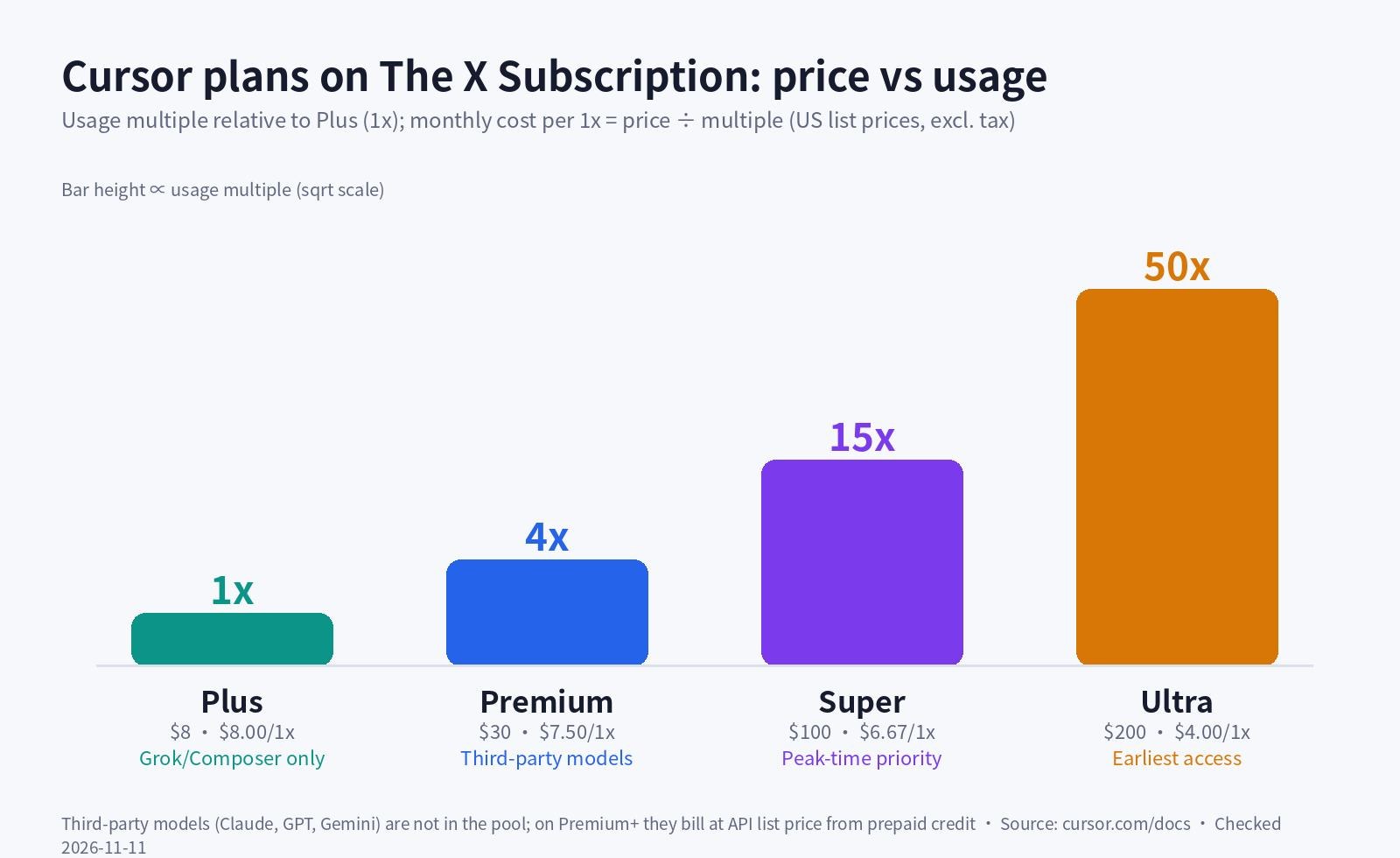
The table below lists the individual plans from Cursor's "Models & Pricing" docs page. Prices are US list prices, excluding tax:
| Plan | Monthly | Annual | Included usage | Third-party models | Key difference |
|---|---|---|---|---|---|
| Free | $0 | — | Limited | Not available | Agent and Chat with limited usage |
| Plus | $8 | $80/yr | Base (1x) | Not available | Cursor's own models only, fixed settings |
| Premium | $30 | $300/yr | 4x Plus | API list price, from prepaid credit | Adds Cloud Agents, Automations, Bugbot, Origin |
| Super | $100 | $1,000/yr | 15x Plus | Same as above | Priority model access at peak times |
| Ultra | $200 | $2,000/yr | 50x Plus | Same as above | Earliest access to new products and models |
- Plus has the most limits: it only runs Grok 4.7, Grok 4.6, Grok 4.5 and Composer 2.5, with Fast off, effort fixed at medium and Grok 4.7 on a 256k context window. It has no Auto, Cloud Agents, Automations, Bugbot or Origin, and no third-party models or your own API keys. Cursor recommends Plus for "social creators with limited AI usage", so it is usually not the place for developers to start.
- Per unit of usage, higher tiers are cheaper: the monthly cost per 1x of usage is about $8 on Plus, $7.50 on Premium, $6.67 on Super and $4 on Ultra.
- Cursor's own recommendation: Premium for new Agent users, Super for daily Agent users, and Ultra for power users running several agents or Automations.
3. How usage works: the weekly pool, third-party models and overage
The biggest change is the usage rule. Each paid plan has one usage pool that covers Cursor's own models and is shared with Grok: Agent in the editor, the CLI, Cloud Agents, Grok Bot and the Grok apps all draw from it.
- Which models: Grok 4.7, Grok 4.6, Grok 4.5 and Composer 2.5. Different models draw from the pool at different rates.
- Weekly reset: the pool refreshes once a week, and unused usage does not roll over.
- Third-party models are not included: Claude, GPT and Gemini are outside the pool. On Premium and above they are billed at the model's API list price from the first request, paid from your prepaid credit; Plus and Free cannot use them.
- Auto: individual plans only have Cost mode (classic Auto), which bills as a Cursor-model request from the pool.
- Your own API key: on individual plans, requests with your own key do not use your included usage or prepaid credit; the provider bills you directly.
When the pool runs out you have three options: wait for the weekly reset, keep going with prepaid credit at the same rates, or upgrade to a higher tier. Cursor stresses that requests are never downgraded in quality or speed. Overage is charged from prepaid credit at these rates (USD per million tokens):
| Model | Input | Cache read | Output | How it bills |
|---|---|---|---|---|
| Composer 2.5 | $0.5 | $0.2 | $2.5 | From credit only after the pool runs out |
| Grok 4.7 | $2 | $0.5 | $6 | From credit only after the pool runs out |
| Claude Sonnet 5.5 | $2 | $0.1 | $10 | From credit from the first request |
| Claude Opus 5.5 | $4 | $0.2 | $20 | From credit from the first request |
| Gemini 3.1 Pro | $2 | $0.2 | $12 | From credit from the first request |
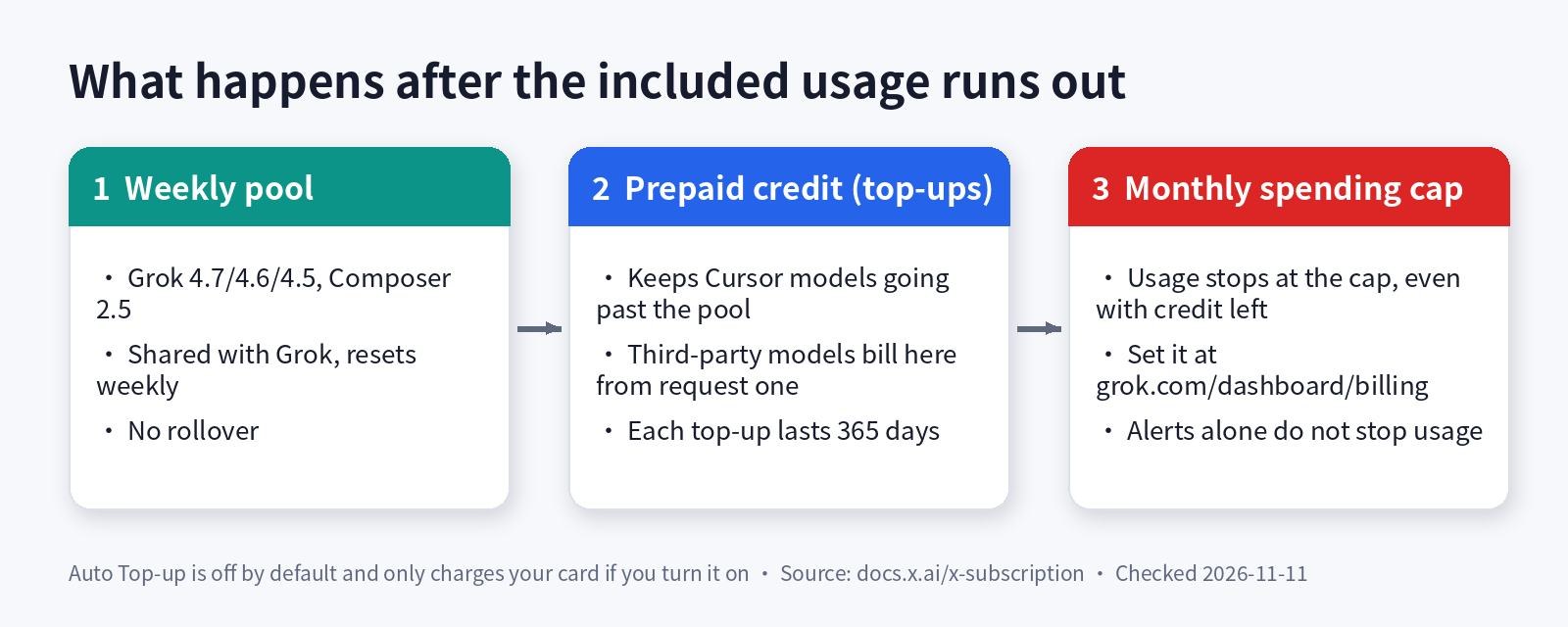
Prepaid credit and the cap are separate things: each top-up stays valid for 365 days, while the "monthly additional usage limit" stops paid usage once reached, even if credit remains. Auto Top-up is off by default and only charges your card if you turn it on.
How to check usage and set a spending cap
- Check this week's usage: open grok.com/dashboard and click Usage in the sidebar to see how much you have used this week, the next reset date and your prepaid credit. Cursor's editor settings also show the remaining usage.
- Buy prepaid credit: go to grok.com/dashboard/billing, click Buy credits on the "Additional usage credits" card, choose an amount and confirm.
- Set a monthly cap: on the same card, click Edit next to "Monthly additional usage limit", enter an amount and save. For a hard stop you must set this cap; spend alerts alone do not stop usage.
- Decide on Auto Top-up: under "Set auto top-up", choose the trigger balance and the amount to add; leave it off if you do not need it.
- Legacy plan users: open the Spending tab in the cursor.com dashboard to see both usage pools and on-demand usage. On legacy individual plans on-demand usage is off by default; turn it on there and set a monthly spend limit.
4. Are legacy Pro, Pro+ and Ultra still worth keeping?
Legacy plans split usage into two pools that reset monthly: "Cursor Models" for Grok and Composer, and "Other Models" for third-party models, drawn down at each model's API price. Pro, Pro+ and Ultra include both pools plus unlimited Tab completions, Bugbot, Cloud Agents, Automations, Origin and the Cursor SDK; Pro+ and Ultra include more of each pool than Pro. After that you can turn on on-demand usage, billed monthly in arrears.
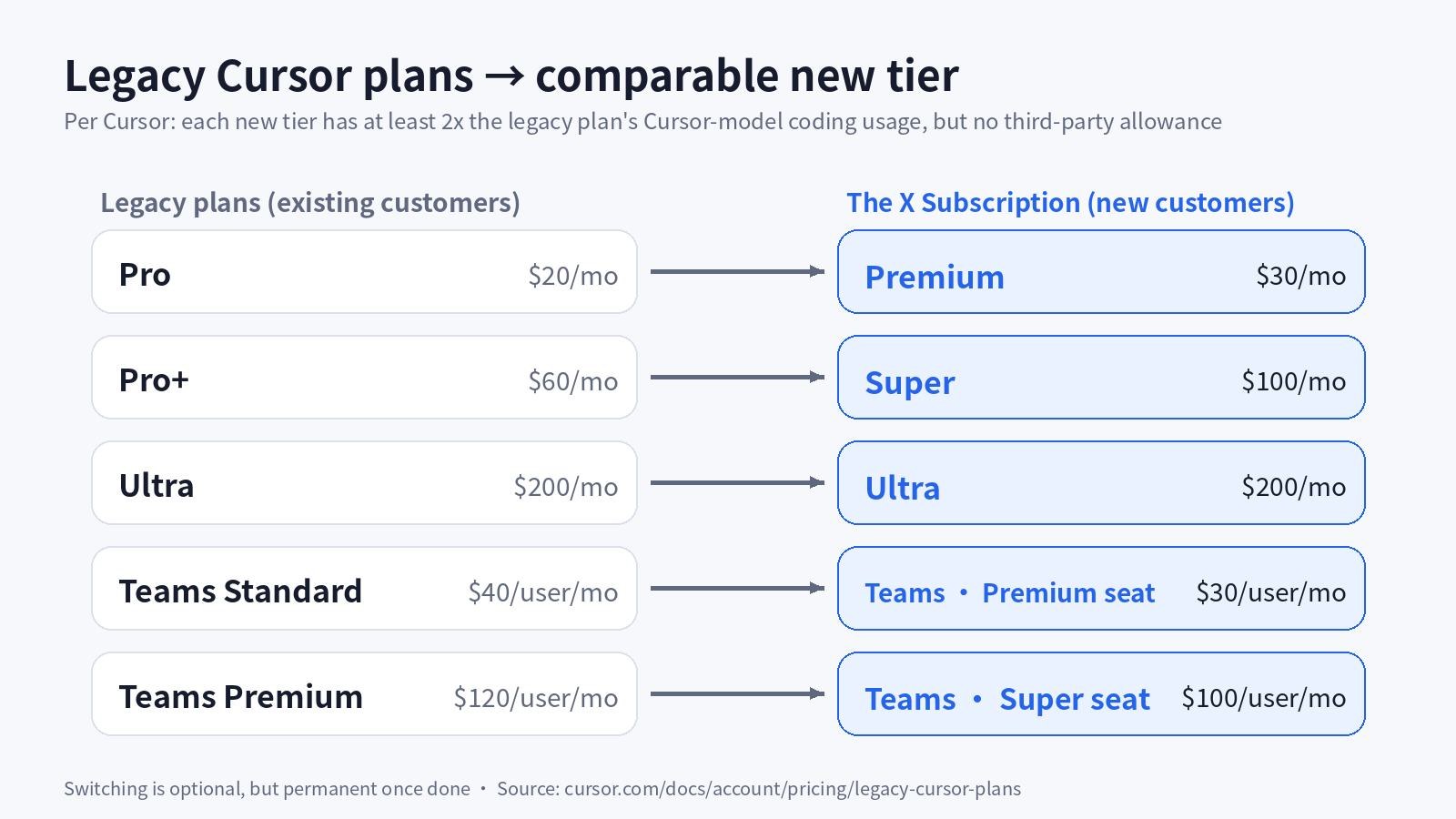
Cursor's official mapping is: Pro ($20) to Premium ($30), Pro+ ($60) to Super ($100), and legacy Ultra ($200) to the new Ultra ($200). Each new tier includes at least twice the Cursor-model coding usage of the legacy plan and adds Grok and X benefits, but it no longer includes a third-party model allowance.
- You mostly code with Claude, GPT or Gemini: the legacy "Other Models" pool may work out cheaper; after switching, all of that comes out of prepaid credit.
- You mostly use Composer and Grok: the new plans give more usage with a weekly reset, so switching makes more sense.
- What happens when you switch: the selected legacy subscriptions are cancelled at checkout with an automatic prorated refund; any on-demand usage not yet invoiced is billed in one final invoice that must be paid first; a new billing cycle starts on the day you switch.
5. Choosing a Teams plan
The new Teams plan is priced per seat. Each member gets a Premium ($30/user/mo), Super ($100/user/mo) or Ultra ($200/user/mo) seat with the same usage as the matching individual plan, and one team can mix seat tiers; Plus is not available for teams. There is also a $0 Free seat with no team usage allowance.
- Usage is not shared: each paid seat has its own weekly pool that cannot be transferred between members; anything beyond it is paid from the team's shared prepaid balance.
- An extra fee on third-party models: on Teams and Enterprise, eligible third-party requests carry the Cursor Token Rate of $0.25 per million tokens on top of the API price, including with your own key; Cursor's own models and Cost mode are exempt, and individual plans never pay it.
- Admin features: centralized billing, usage analytics, team-wide privacy mode, SAML/OIDC SSO, and team-wide and per-member monthly spending limits set by admins.
- Seat changes: adding a member mid-cycle is pro-rated; seat upgrades apply immediately and downgrades at the end of the billing period.
- Legacy teams: Standard ($40/user/mo) and Premium ($120/user/mo, 5x the Standard allowance) seats keep working, and you can still add seats.
6. Which tier to buy: match it to how you work
- Just trying Cursor: start on Free and make sure the editor suits you before paying.
- Coding every day, new to Agent: choose Premium. It is the lowest tier with third-party models such as Claude and GPT, Cloud Agents and Bugbot.
- Agent runs all day and Premium runs out every week: choose Super, with 3.75x Premium usage and priority at peak times.
- Several agents at once, long-running Automations: choose Ultra, which has the cheapest usage per unit.
- Already on Pro or Pro+: if you rely heavily on third-party models, don't rush to switch; consider switching if you mainly use Composer and Grok.
- Team collaboration: choose Teams and give each person a Premium, Super or Ultra seat based on their usage.
7. OpenAI models may leave Cursor
An OpenAI Help Center article states that OpenAI plans to wind down its contract providing OpenAI models to Cursor, with a proposed transition period of November 12, 2026. During that period OpenAI would keep providing the OpenAI models Cursor uses today; Cursor may end access sooner, and the official termination date will be shared once both companies confirm it. On the day we checked, Cursor's model price list still showed the GPT-5.6 family.
What this means for choosing a plan: if your main reason for buying Cursor is to use GPT models inside it, don't buy a higher tier for that. OpenAI's suggested alternatives are adding your own OpenAI API key in Cursor (local Chat and Agent only) or installing the Codex extension and signing in with a ChatGPT subscription.
Checked on 2026-11-11. Sources: Cursor pricing page, Models & Pricing, Legacy Cursor plans, Team Pricing, Usage and limits, What is The X Subscription, The X Subscription Pricing, Managing The X Subscription, Cursor blog, OpenAI Help Center. Prices, models and usage rules change often; the official site prevails.
Switching from a legacy plan cannot be undone, and the third-party model allowance goes with it. A Cursor subscription paid through the App Store is not cancelled automatically when you switch; cancel it yourself in iPhone Settings or Apple will keep billing you. Don't turn on Auto Top-up before you have set a monthly additional usage limit.
Picked your tier? We offer Cursor accounts and subscriptions; availability and prices for each tier are shown live on the product page. If you run into sign-in, lag or "model not available" issues, check the common problems guide first.