
Many people paying for ChatGPT Plus with a virtual card get stuck on the “free trial” or discount checkout and see the payment declined again and again. The cause is usually not the card itself but the AI platform's risk controls.
This guide first covers 3 cases virtual cards don't support, then 3 ways to skip the $0 trial and pay the full price. Try them in order.
1. 3 Cases Virtual Cards Don't Support
$0 trials and discounted checkout
Most AI companies now apply strict risk checks to free trials, first-month discounts and promo codes. Using a virtual card on these paths rarely works: you'll often see “card declined” or an instant refund.
The rule of thumb: if you're paying with a virtual card, go straight to full-price checkout.
One card on multiple accounts
Linking one card to several ChatGPT accounts is easily flagged as unusual activity. At best the payment fails; at worst the accounts get restricted.
If you have more than one account, give each its own card. Need several? You can buy one card per account at 5buyai.com.
Misusing cards or AI services
Bulk sign-ups, reselling or sharing subscriptions, or any use that breaks the platform's terms can get the card frozen and the AI account banned, usually with no way to appeal. Use your card only for your own normal subscriptions.
Takeaway: check three things before you pay. The amount is the full price, the card isn't linked to another account, and the account is yours alone. Tick all three and your odds are best.
2. 3 Ways to Skip the $0 Trial
If checkout keeps showing “Try Plus free for 1 month,” try these in order to switch to full-price payment.
Method 1: Subscribe in the official app
Download the official ChatGPT app from the App Store (iPhone) or Google Play (Android), sign in, and tap upgrade to Plus inside the app.
Payment goes through your Apple ID (balance or linked card) or Google Play billing. Mobile checkout usually skips the web free-trial flow and charges the full price directly.
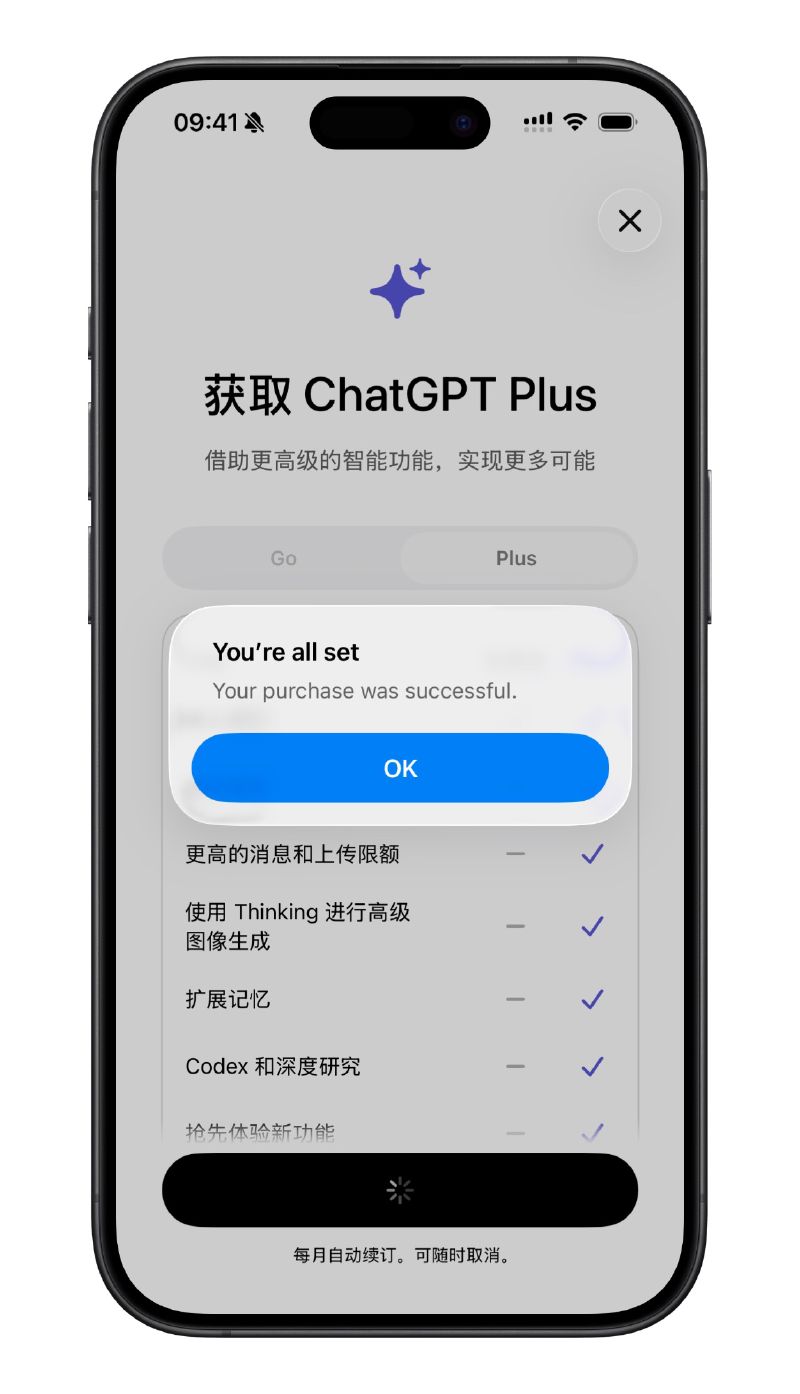
Image: Upgrading to Plus inside the official app, billed through the app store
Method 2: Change your network and browser environment
Free trials are mostly targeted promotions for certain regions or new users. A different environment often brings back the regular checkout:
- Switch to a stable, clean network connection and reload the page;
- Sign in again in your browser's incognito/private mode;
- Go straight to the standard pricing page at
https://chatgpt.com/#pricingand see whether the regular full-price checkout returns.
Note: use a stable, genuine connection and avoid hopping between regions, which can itself trigger risk checks. Always follow OpenAI's terms of use and your local regulations.
Method 3: Edit the checkout URL (may no longer work)
If the pricing page URL includes a trial parameter, for example:
https://chatgpt.com/?promo_campaign=plus-1-month-free#pricingDelete plus-1-month-free so it reads:
https://chatgpt.com/?promo_campaign=#pricingAfter refreshing, the Plus card shows the full price. Click “Upgrade to Plus” to pay at the regular rate.
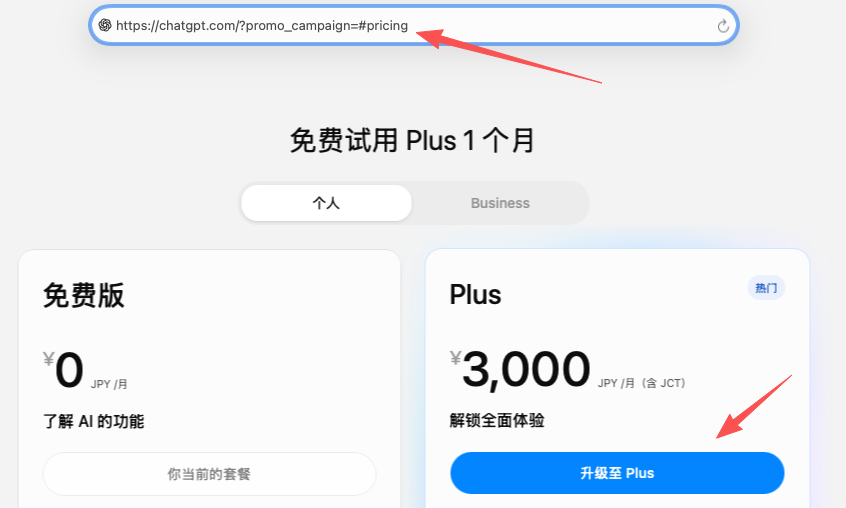
Image: With the trial parameter removed, Plus shows the full price (Japan region shown, priced in local currency)
Takeaway: don't worry if the page heading still says “free trial.” What matters is the price on the Plus card. Double-check the amount on the checkout page before you pay.
3. Summary at a Glance
| Case / Method | Recommended? | Notes |
|---|---|---|
| $0 trial / discounts | Not supported | Strict risk checks; virtual cards rarely succeed |
| One card, many accounts | Not supported | Link each card to one account only |
| Official app | Try first | Mobile usually charges full price directly |
| New network + browser | Worth a try | Incognito mode + standard pricing page |
| Edit checkout URL | Worth a try | Remove the trial parameter; may be patched |
Plus pricing is as shown on OpenAI's official checkout; some regions bill in local currency with tax included. Trial and risk policies change often, so these methods aren't guaranteed to keep working.
Need a card that works for AI subscriptions? Get a virtual credit card at 5buyai.com, one card per account, and subscribe to ChatGPT Plus at full price with fewer headaches. Bookmark this guide and leave a comment if you hit a new issue.